
Feature Importance
A model makes a prediction, and the first thing a client asks is: what is it based on? A revenue manager, a loan officer or a doctor will not act on predictions from a black box. Being able to say which factors drive the predictions is often what gets a model trusted and used.
Feature importance scores answer that question: they measure how much each feature contributes to the model's predictions. A decision tree scores a feature by how much its splits reduce impurity (gini or entropy), added up over every split that uses it, so that all the scores sum to 1 — How the Scores Are Calculated at the end of this page works through one tree by hand.
In this lecture we get the importance scores from a decision tree inside a full pipeline, turn them into an explanation a client can use, and then look at using them to simplify the pipeline.
Train the Model
The same full pipeline and grid search as in Full Pipeline:
import pandas as pd
import matplotlib.pyplot as plt
plt.style.use('ggplot')
from sklearn.model_selection import train_test_split
from sklearn.pipeline import Pipeline
from sklearn.impute import SimpleImputer
from sklearn.preprocessing import StandardScaler, OneHotEncoder
from sklearn.compose import ColumnTransformer
from sklearn.tree import DecisionTreeClassifier
from sklearn.model_selection import GridSearchCV

# load data titanic data
df = pd.read_csv('titanic.csv')

# remove unimportant features
X = df.drop(['Survived', 'PassengerId', 'Name', 'Ticket', 'Cabin'], axis=1)
y = df['Survived']

# train-test split
X_train, X_test, y_train, y_test = train_test_split(X, y, test_size=0.2, random_state=42)

# separate numerical and categorical features 7 in total
num_features = ['Age', 'SibSp', 'Fare', 'Parch']
cat_features = ['Sex', 'Embarked', 'Pclass']

# numerical feature pipeline
num_pipeline = Pipeline(
    steps=[
        ('num_imputer', SimpleImputer()),
        ('scaler', StandardScaler()),
        ]
)

# categorical feature pipeline
cat_pipeline = Pipeline(
    steps=[
        ('cat_imputer', SimpleImputer()),
        ('onehot', OneHotEncoder()),
    ]
)

# Assign features to the pipelines and Combine two pipelines to form the preprocessor
preprocessor = ColumnTransformer(
    transformers=[
        ('num_pipeline', num_pipeline, num_features),
        ('cat_pipeline', cat_pipeline, cat_features),
    ]
)

# make a full pipeline by combining preprocessor and the model
# random_state=42 makes the tree the same every time you run this
tree_final_pipeline = Pipeline(
    steps=[
        ('preprocessor', preprocessor),
        ('tree_clf', DecisionTreeClassifier(random_state=42)),
    ]
)

# set up hyperparameters we want to tune
param_grid = [
    {
        'preprocessor__num_pipeline__num_imputer__strategy': ['mean', 'median'],
        'preprocessor__cat_pipeline__cat_imputer__strategy': ['most_frequent'],
        'tree_clf__criterion': ['gini', 'entropy'],
        'tree_clf__max_depth': [3, 5, 7, 9, 11],
    }
]

# set up the grid search
grid_search = GridSearchCV(tree_final_pipeline, param_grid, cv=10, scoring='accuracy')

# train the model using the full pipeline
grid_search.fit(X_train, y_train);  # ; hides the fitted-model display, which some VS Code setups cannot render
After running the code above, we can get the best parameters, the best model, and its cross validation score:
# check the best performing parameter combination
print(grid_search.best_params_)

# select the best model
tree_clf_best = grid_search.best_estimator_

# best cross validation score
print(grid_search.best_score_)
{'preprocessor__cat_pipeline__cat_imputer__strategy': 'most_frequent', 'preprocessor__num_pipeline__num_imputer__strategy': 'mean', 'tree_clf__criterion': 'entropy', 'tree_clf__max_depth': 3}
0.8258411580594679Get the Importance Scores
We can print out the feature importance scores (why 7 features but 12 feature importance scores?):
# feature importance: why 7 features 12 score?
tree_clf_best['tree_clf'].feature_importances_
array([0.08110601, 0.05513595, 0.0608736 , 0. , 0.54533576,
0. , 0. , 0. , 0. , 0.05311821,
0. , 0.20443047])Answer: it's because of the one-hot encoding! Each category becomes its own column, so we need to find the feature names after one-hot encoding. The fitted preprocessor keeps its two pipelines in transformers_, a list with one tuple per pipeline:
# this is a tuple with three elements
# ('name of the pipeline', the pipeline, the feature names the pipeline is applied to)
tree_clf_best['preprocessor'].transformers_[1]
('cat_pipeline',
Pipeline(steps=[('cat_imputer', SimpleImputer(strategy='most_frequent')),
('onehot', OneHotEncoder())]),
['Sex', 'Embarked', 'Pclass'])So we can select the fitted cat_pipeline and ask its one-hot encoder for the names of the columns it created:
# select the fitted cat pipeline
fitted_cat_pipeline = tree_clf_best['preprocessor'].transformers_[1][1]

# get the one-hot features as a numpy array
one_hot_features = fitted_cat_pipeline['onehot'].get_feature_names_out(cat_features)
one_hot_features
array(['Sex_female', 'Sex_male', 'Embarked_C', 'Embarked_Q', 'Embarked_S',
'Pclass_1', 'Pclass_2', 'Pclass_3'], dtype=object)The numerical features come first and keep their names, so all 12 feature names, in the same order as the scores, are:
# convert one hot features from a numpy array to a list
feature_names = num_features + list(one_hot_features)
feature_names
['Age', 'SibSp', 'Fare', 'Parch',
'Sex_female', 'Sex_male',
'Embarked_C', 'Embarked_Q', 'Embarked_S',
'Pclass_1', 'Pclass_2', 'Pclass_3']Now we can put the names and the scores together:
# get importance score and generate a df
importance_scores = tree_clf_best['tree_clf'].feature_importances_

# generate a dataframe
df_importance_score = pd.DataFrame(importance_scores, index=feature_names, columns=['importance'])

# sort the dataframe
df_importance_score.sort_values('importance', ascending=False, inplace=True)

df_importance_score
importance
Sex_female 0.545336
Pclass_3 0.204430
Age 0.081106
Fare 0.060874
SibSp 0.055136
Pclass_1 0.053118
Parch 0.000000
Sex_male 0.000000
Embarked_C 0.000000
Embarked_Q 0.000000
Embarked_S 0.000000
Pclass_2 0.000000Explain the Model to a Client
The scores are for the model's 12 columns. A client thinks in the 7 original features — nobody asks how important Sex_female is.
Add Up the One-Hot Columns
Sex_female and Sex_male are both Sex, and Pclass_1, Pclass_2 and Pclass_3 are all Pclass. The one-hot names are the original name, an underscore, then the category, so the part before the underscore tells us which original feature each column came from:
# the original feature is the part of the name before the underscore: Sex_female -> Sex
original_feature = df_importance_score.index.str.split('_').str[0]

# add up the scores of each original feature's columns
df_by_feature = df_importance_score.groupby(original_feature).sum()
df_by_feature = df_by_feature.sort_values('importance', ascending=False)
df_by_feature
importance
Sex 0.545336
Pclass 0.257549
Age 0.081106
Fare 0.060874
SibSp 0.055136
Embarked 0.000000
Parch 0.000000# plot the importance of each original feature
df_by_feature.plot.bar(legend=False, title='Feature importance', rot=0);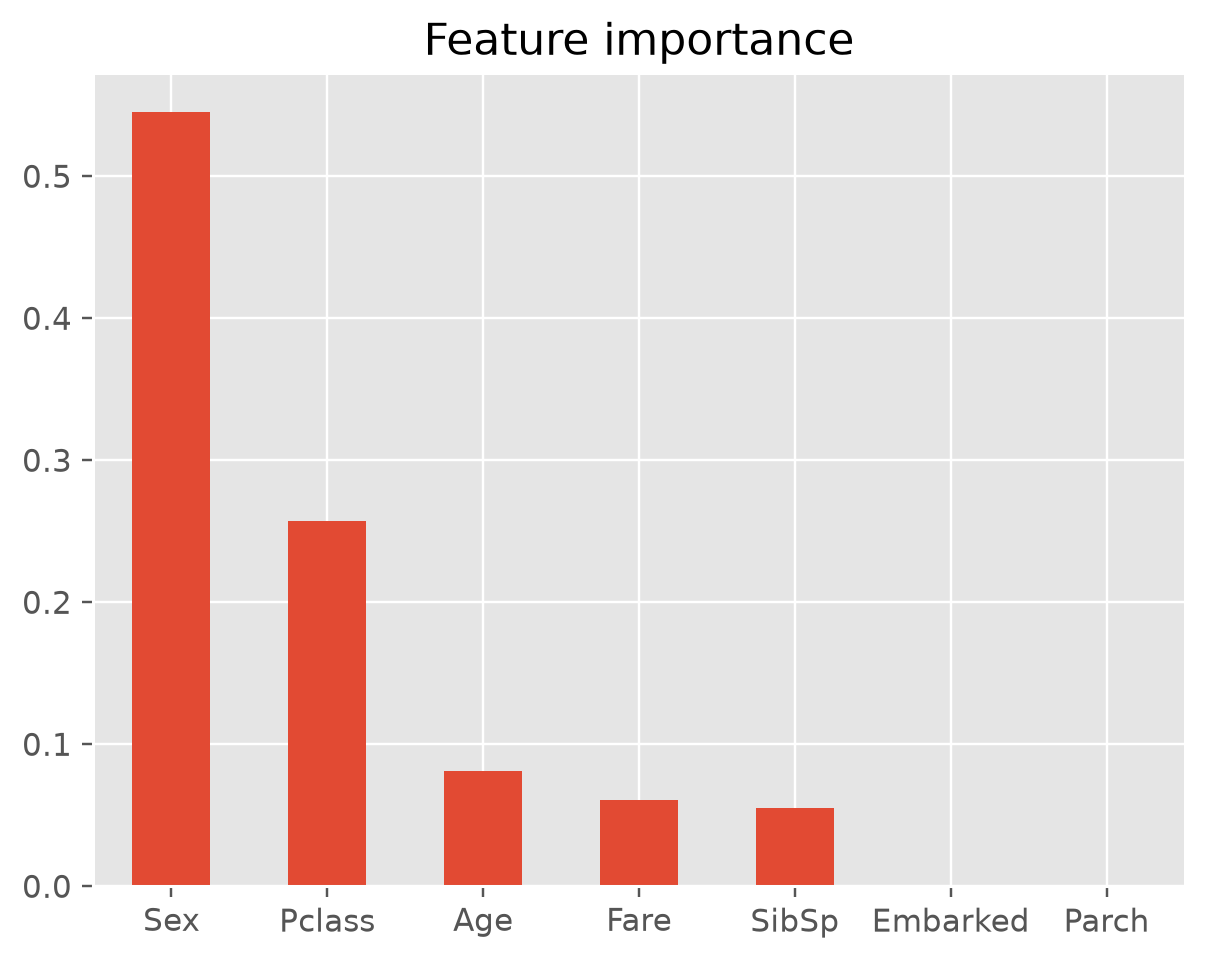
Put It in a Sentence
A chart is not an explanation yet. Turn it into a sentence a client could repeat:
The model's predictions depend mostly on the passenger's sex (55% of the importance), then on ticket class (26%). Age, fare and the number of siblings or spouses aboard matter a little (5–8% each). The port of embarkation and the number of parents or children aboard play no role in this model.
Check the Direction
An importance score says how much a feature matters, not which way it pushes the prediction. "Sex matters" does not tell the client whether women or men were more likely to survive. For that, look at the survival rate in each group of the training data:
# importance has no direction: check the survival rate of each group in the training data
print(y_train.groupby(X_train['Sex']).mean())
print(y_train.groupby(X_train['Pclass']).mean())
Sex
female 0.738776
male 0.186296
Name: Survived, dtype: float64
Pclass
1 0.607362
2 0.483444
3 0.241206
Name: Survived, dtype: float64Women survived far more often than men (74% vs 19%), and survival fell with each ticket class (61%, 48%, 24%). Now the client gets the full sentence: being female and traveling in a higher class raise the predicted chance of survival.
Read the Tree Itself
The best tree has a depth of only 3, so we can show the client the tree itself — its rules are the explanation, and the importance scores summarize it:
from sklearn import tree

fig, ax = plt.subplots(figsize=(22, 8))
tree.plot_tree(tree_clf_best['tree_clf'], feature_names=feature_names,
               class_names=['died', 'survived'], filled=True, fontsize=10, ax=ax);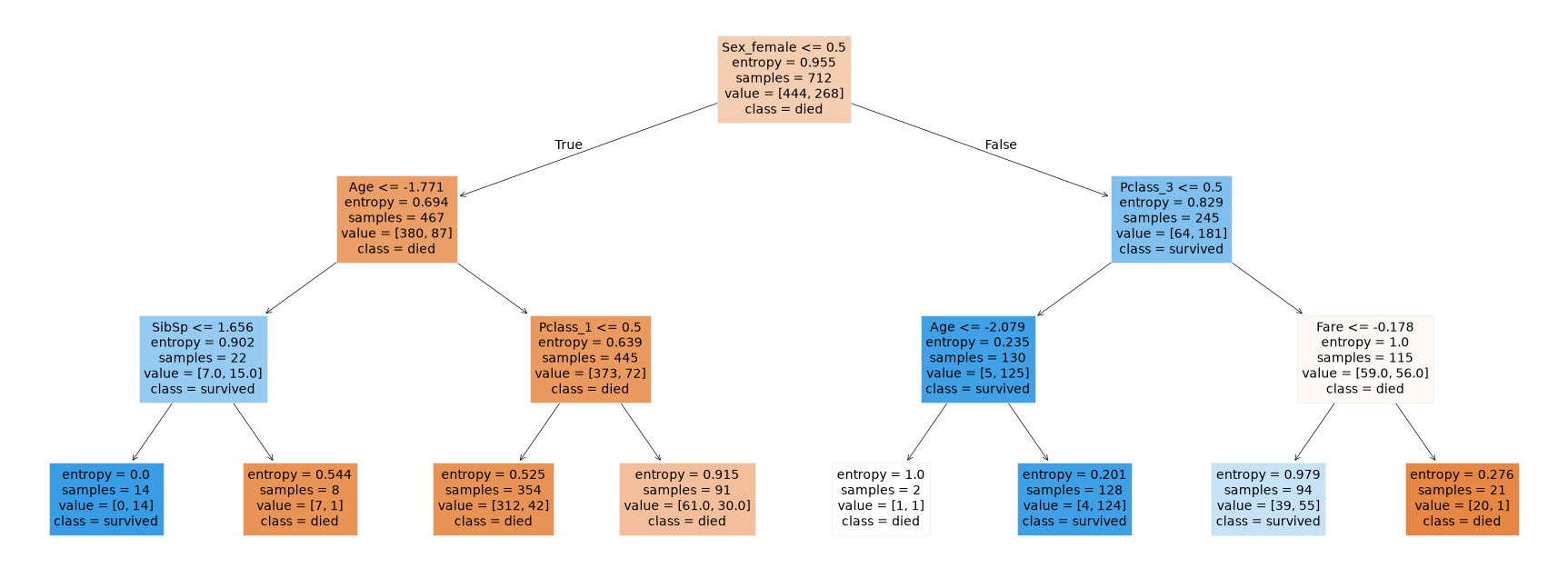
Read from the top, the tree is three rules a client can follow:
- A male passenger is predicted to die — unless he is a boy of about 6 or younger with at most two siblings aboard (all 14 such boys in the training data survived).
- A female passenger in first or second class is predicted to survive (124 of 128 in the training data did).
- A female passenger in third class is predicted to survive if her fare was about £23 or less, and to die if it was higher (only 1 of 21 survived).
Two things to know when reading it:
- The numbers on
Age,SibSpandFareare scaled. The pipeline standardizes numerical features before the tree sees them, soAge <= -1.771means "1.771 standard deviations below the average age" — about 6.5 years — andFare <= -0.178is about £23. Trees don't need scaling, so to see thresholds in the original units, leave theStandardScalerout of the pipeline. Sex_female <= 0.5means male. A one-hot column is 1 or 0, so "at most 0.5" means the column is 0 — the passenger is not female. TheTruebranch is always the left one.
For a small tree, showing the tree is the clearest explanation. For models with no single tree to show — such as the random forests in Ensemble Learning, which combine hundreds of trees — importance scores become the main way to explain the model.
What Importance Does Not Tell You
- No direction — as above, check the groups to see which way a feature pushes.
- Not cause and effect — importance shows what predicts survival, not what caused it.
Pclasspredicts survival, but the ticket itself saved no one; what mattered was what came with it. - Zero means "this model didn't use it", not "irrelevant" —
Parch(parents and children aboard) overlaps withSibSp(siblings and spouses aboard), and a depth-3 tree only has room for a few splits. A deeper tree, or a different model, might use it.
Use Importance to Simplify the Pipeline
Parch and Embarked scored 0 — the tree never split on them. What happens if we drop them and run the same grid search again?
# drop the two features the tree never used, and run the same grid search again
num_features = ['Age', 'SibSp', 'Fare']
cat_features = ['Sex', 'Pclass']

tree_final_pipeline.set_params(preprocessor__transformers=[
    ('num_pipeline', num_pipeline, num_features),
    ('cat_pipeline', cat_pipeline, cat_features),
])
grid_search_5 = GridSearchCV(tree_final_pipeline, param_grid, cv=10, scoring='accuracy')
grid_search_5.fit(X_train, y_train);

print('best CV accuracy with 7 features:', round(grid_search.best_score_, 4))
print('best CV accuracy with 5 features:', round(grid_search_5.best_score_, 4))
print('leaves with 7 features:', tree_clf_best['tree_clf'].get_n_leaves())
print('leaves with 5 features:', grid_search_5.best_estimator_['tree_clf'].get_n_leaves())
best CV accuracy with 7 features: 0.8258
best CV accuracy with 5 features: 0.8258
leaves with 7 features: 8
leaves with 5 features: 8The score is exactly the same, and so is the tree: 8 leaves, the same splits. The depth-3 tree never split on Parch or Embarked, so removing them changes nothing about the model.
So the gain is a simpler pipeline — two fewer columns to collect, clean and keep available at prediction time — not better accuracy, and not a simpler explanation: the tree was already easy to explain because max_depth=3 kept it small. Dropping features the tree does use would cost accuracy, so make that call with cross validation, as here, never with the test set.
Why Do Feature Importance in Practice?
Selecting features, as we did above, is actually one of the less common reasons. The usual ones, roughly in order of how often they come up — illustrated with the hotel from the Lakeside booking cancellation example, where the model predicts which bookings will be canceled:
- Explaining the model to the people who use it. A revenue manager won't act on predictions from a black box. As in the Lakeside example, "deposit type and lead time drive most of the cancellations" builds trust and gets the model adopted. In business, this is the #1 reason.
- Catching mistakes, especially data leakage. If one feature is suspiciously dominant, it is often information the model shouldn't have. In the Lakeside example, a "refund issued" column would predict cancellations perfectly — because refunds happen after the cancellation. Checking importances is the fastest way to spot this before it embarrasses you in production.
- Business insight. Sometimes the model is a tool for finding the drivers: what separates churners from loyal customers, what predicts a loan default. Importances point to where to look next. Remember they show what predicts, not what causes: in the Lakeside example, cutting lead times won't by itself stop cancellations.
- Fairness and compliance. Regulations in credit, insurance and hiring require you to explain decisions and avoid protected attributes. Importances show whether the model leans on
Sex— the most important feature on this page — or on a stand-in for it, such as a zip code standing in for race. - Simplifying the pipeline — the feature selection case on this page: dropping inputs that cost money to collect and maintain.
- Monitoring after deployment. If an important feature's data changes — in the Lakeside example, a booking channel being renamed — you know the model is at risk.
How the Scores Are Calculated
Where does Sex_female's 0.545 come from? It is the root split's share of all the entropy the tree removes. Every number below can be read off the tree above.
Step 1: The Root Split's Information Gain
The root holds all 712 training passengers: 444 died and 268 survived.
| Node | Passengers | Died / survived | Entropy |
|---|---|---|---|
| Root | 712 | 444 / 268 | 0.9555 |
Left: Sex_female <= 0.5, i.e. male | 467 | 380 / 87 | 0.6937 |
| Right: female | 245 | 64 / 181 | 0.8286 |
The weighted entropy after the split is
so the information gain is 0.9555 − 0.7401 = 0.2154, the same calculation as in Information Gain/Entropy Reduction.
Step 2: Weight Every Split by Its Share of Passengers
A split lower in the tree only sees some of the passengers, so its gain is multiplied by the share of the 712 passengers that reach it:
where is the number of passengers at a node and its entropy. For example, the Pclass_3 split on the female side:
All seven splits in the tree:
| Node | Split on | Passengers | Weighted gain |
|---|---|---|---|
| root | Sex_female | 712 | 0.2154 |
| female | Pclass_3 | 245 | 0.0807 |
| male | Age | 467 | 0.0280 |
| female, third class | Fare | 115 | 0.0240 |
| boys | SibSp | 22 | 0.0218 |
| male, older | Pclass_1 | 445 | 0.0210 |
| female, first or second class | Age | 130 | 0.0041 |
| Total | 0.3949 |
Step 3: Add Up by Feature and Divide by the Total
| Feature | Sum of its gains | Importance = sum ÷ 0.3949 |
|---|---|---|
Sex_female | 0.2154 | 0.545 |
Pclass_3 | 0.0807 | 0.204 |
Age (used twice) | 0.0280 + 0.0041 = 0.0320 | 0.081 |
Fare | 0.0240 | 0.061 |
SibSp | 0.0218 | 0.055 |
Pclass_1 | 0.0210 | 0.053 |
Sex_male and the rest | 0 (never split on) | 0 |
Dividing by the total is what makes the scores sum to 1. Three things to notice:
- The root split dominates. It sorts all 712 passengers and removes the most entropy.
- "Added up over every split" in action:
Ageis used twice, and its two gains are summed. Sex_malescores 0, although it holds exactly the same information asSex_female. The tree happened to split onSex_female— another case of "zero means this model didn't use it, not irrelevant."