
Polynomial Regression and Regularization
A decision tree that grows too deep overfits, and we fix it by pruning — limiting how complex the tree may become. That fix is called regularization (see the overfitting remedies in Model Evaluation Basics). Linear models can overfit too, once they have many features. In this lecture, we first make a linear model complex enough to overfit, using polynomial regression, and then regularize it with ridge and lasso regression.
Run the code in a notebook in your ml4biz project; no dataset download is needed.
Polynomial Regression
What if the data is not a straight line? We generate 20 training points from a curved relationship, , plus some noise, and 1000 new points from the same relationship to test the models:
import numpy as np
import matplotlib.pyplot as plt
plt.style.use('seaborn-v0_8')

np.random.seed(42)

# 20 training points from a curved relationship: y = 0.5x^2 + x + 2, plus noise
X_train = 6 * np.random.rand(20, 1) - 3  # 20 random numbers between -3 and 3
y_train = 0.5 * X_train[:, 0] ** 2 + X_train[:, 0] + 2 + np.random.randn(20)

# 1000 new points from the same relationship, to test the models
X_test = 6 * np.random.rand(1000, 1) - 3
y_test = 0.5 * X_test[:, 0] ** 2 + X_test[:, 0] + 2 + np.random.randn(1000)
A straight line can't fit a curve. Polynomial regression adds powers of each feature as new features — , , and so on — and then fits a linear regression model on them. With degree 2, the model is:
This is still linear regression: the prediction is a weighted sum of the features, so the model is linear in and , even though its curve is not a straight line. scikit-learn's PolynomialFeatures adds the new features:
from sklearn.preprocessing import PolynomialFeatures

poly_features = PolynomialFeatures(degree=2, include_bias=False)
X_poly = poly_features.fit_transform(X_train)

print(X_train[0])  # the original feature x
print(X_poly[0])   # x and x^2

Output:
[-0.75275929]
[-0.75275929  0.56664654]
What Does "Linear" Mean?
The "linear" in linear model refers to the parameters and , not to the shape of the curve. A model is linear when its prediction is a weighted sum of the features:
Each weight multiplies one feature, and the results are added up. The features themselves can be anything we compute from the data — , , or a one-hot encoded column. Once PolynomialFeatures has computed , the model just sees another column of numbers. Call it , and the degree 2 model becomes:
which is exactly the multivariate linear regression from the Linear Regression lecture. That is why we fit it with plain LinearRegression(), and why the normal equation and gradient descent work unchanged. The curve comes from the features, not from the model.
For classification, a linear model draws a straight decision boundary — a line, plane, or hyperplane — in the features it sees.
A model is not linear when the parameters enter in any other way, such as (a weight in an exponent), or when it doesn't use a weighted sum at all, like a decision tree.
Keep two things apart: the model (the form of the prediction) and the training algorithm (how we find and ). The normal equation and gradient descent are training algorithms. A linear regression model can be trained with either, and gradient descent can also train models that are not linear, such as neural networks.
Here is how the models in this course compare:
| Model | Linear model? | Why |
|---|---|---|
| Linear regression | Yes | a weighted sum of the features |
| Polynomial regression | Yes | linear regression on — linear in and , curved in |
| Ridge and lasso regression | Yes | linear regression with a penalty — regularization changes how and are found, not the form of the model |
SGDRegressor | Yes | a linear regression model trained with stochastic gradient descent |
| Gradient descent | Not a model | a training algorithm that finds and , for linear and non-linear models alike |
SVM with kernel='linear' | Yes | a straight boundary: a weighted sum of the features |
SVM with kernel='poly' or 'rbf' | No | linear only in a transformed feature space the kernel creates — the same trick as polynomial features — so the boundary is curved in the original features |
| Logistic regression | Yes | a weighted sum of the features, turned into a probability; its decision boundary is straight |
| Decision tree, random forest, boosting | No | they split the data into regions instead of adding up weighted features |
Underfitting and Overfitting
The degree controls how complex the model is. Let's fit polynomials of degree 1 (a straight line), 2, and 15, and compare the RMSE on the training and test data. We scale the features because is on a very different scale from :
from sklearn.pipeline import Pipeline
from sklearn.preprocessing import StandardScaler
from sklearn.linear_model import LinearRegression
from sklearn.metrics import mean_squared_error

def rmse(model, X, y):
    return np.sqrt(mean_squared_error(y, model.predict(X)))

for degree in [1, 2, 15]:
    poly_reg = Pipeline([
        ('poly', PolynomialFeatures(degree=degree, include_bias=False)),
        ('scaler', StandardScaler()),
        ('lin_reg', LinearRegression()),
    ])
    poly_reg.fit(X_train, y_train)
    print(f'degree {degree}: train rmse {rmse(poly_reg, X_train, y_train):.3f}, '
          f'test rmse {rmse(poly_reg, X_test, y_test):.3f}')

print('largest weight for degree 15:', np.abs(poly_reg['lin_reg'].coef_).max().round(1))

Output:
degree 1: train rmse 1.721, test rmse 1.703
degree 2: train rmse 0.863, test rmse 1.105
degree 15: train rmse 0.537, test rmse 10.619
largest weight for degree 15: 34315.2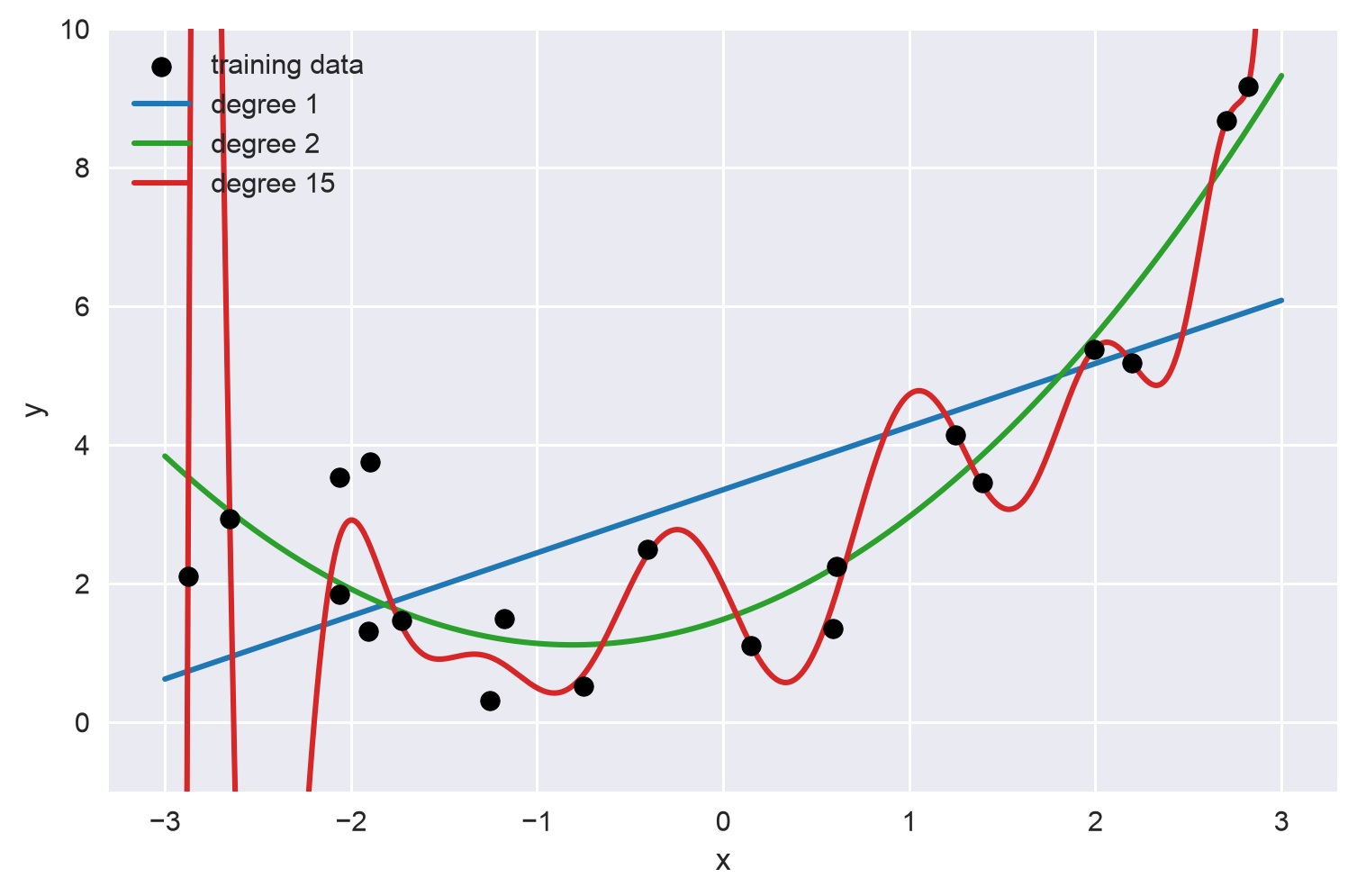
The code for the figures on this page is in the Appendix.
- Degree 1 underfits: a straight line can't follow the curve, so both errors are high.
- Degree 2 fits well: the test RMSE (1.105) is close to the best possible, because the noise we added has a standard deviation of 1.
- Degree 15 overfits: it has the lowest training error, but it wiggles through the training points — fitting the noise — and its test error is almost 10 times worse. Notice its huge weights (up to 34,315): large weights let the model bend sharply to reach every point.
On real data, we don't know the right degree. Instead of guessing, we can give the model plenty of features and regularize it, so it can't use them to overfit.
Regularization
Regularization adds a penalty on large weights to the cost function that training minimizes. The model now has two goals: fit the training data (a low MSE) and keep its weights small. The hyperparameter (alpha) controls the balance:
- : no regularization — plain linear regression
- a larger : smaller weights and a simpler, smoother model — too large, and the model underfits
The bias term is not penalized. Because the penalty depends on the size of the weights, always scale the features before regularizing.
Ridge Regression
Ridge regression penalizes the sum of the squared weights (also called L2 regularization):
scikit-learn scales the two terms slightly differently, but the idea is the same. Let's regularize the degree 15 model with different values:
from sklearn.linear_model import Ridge

for alpha in [0.01, 0.1, 1, 10, 100]:
    ridge_reg = Pipeline([
        ('poly', PolynomialFeatures(degree=15, include_bias=False)),
        ('scaler', StandardScaler()),
        ('ridge', Ridge(alpha=alpha)),
    ])
    ridge_reg.fit(X_train, y_train)
    print(f'alpha {alpha}: train rmse {rmse(ridge_reg, X_train, y_train):.3f}, '
          f'test rmse {rmse(ridge_reg, X_test, y_test):.3f}, '
          f'largest weight {np.abs(ridge_reg["ridge"].coef_).max():.2f}')

Output:
alpha 0.01: train rmse 0.695, test rmse 1.221, largest weight 2.82
alpha 0.1: train rmse 0.712, test rmse 1.229, largest weight 1.58
alpha 1: train rmse 0.747, test rmse 1.237, largest weight 1.06
alpha 10: train rmse 0.929, test rmse 1.411, largest weight 0.52
alpha 100: train rmse 1.414, test rmse 1.750, largest weight 0.16
Even a small shrinks the largest weight from 34,315 to about 3 and brings the test RMSE from 10.6 down to about 1.2. As grows, the weights keep shrinking and the model gets simpler — at it underfits about as badly as the straight line. Like any hyperparameter, should be tuned, for example with grid search.
Lasso Regression
Lasso regression (Least Absolute Shrinkage and Selection Operator) penalizes the sum of the absolute values of the weights (also called L1 regularization):
The difference matters: lasso tends to set the weights of the least important features to exactly 0, removing those features from the model. In other words, lasso performs automatic feature selection:
from sklearn.linear_model import Lasso

lasso_reg = Pipeline([
    ('poly', PolynomialFeatures(degree=15, include_bias=False)),
    ('scaler', StandardScaler()),
    ('lasso', Lasso(alpha=0.1)),
])
lasso_reg.fit(X_train, y_train)

print(f'train rmse {rmse(lasso_reg, X_train, y_train):.3f}, test rmse {rmse(lasso_reg, X_test, y_test):.3f}')
print('weights:', lasso_reg['lasso'].coef_.round(2))
print('features kept:', (lasso_reg['lasso'].coef_ != 0).sum(), 'of 15')

Output:
train rmse 0.748, test rmse 1.207
weights: [1.17 1.41 0.   0.   0.   0.   0.   0.   0.   0.   0.42 0.   0.13 0.
 0.  ]
features kept: 4 of 15
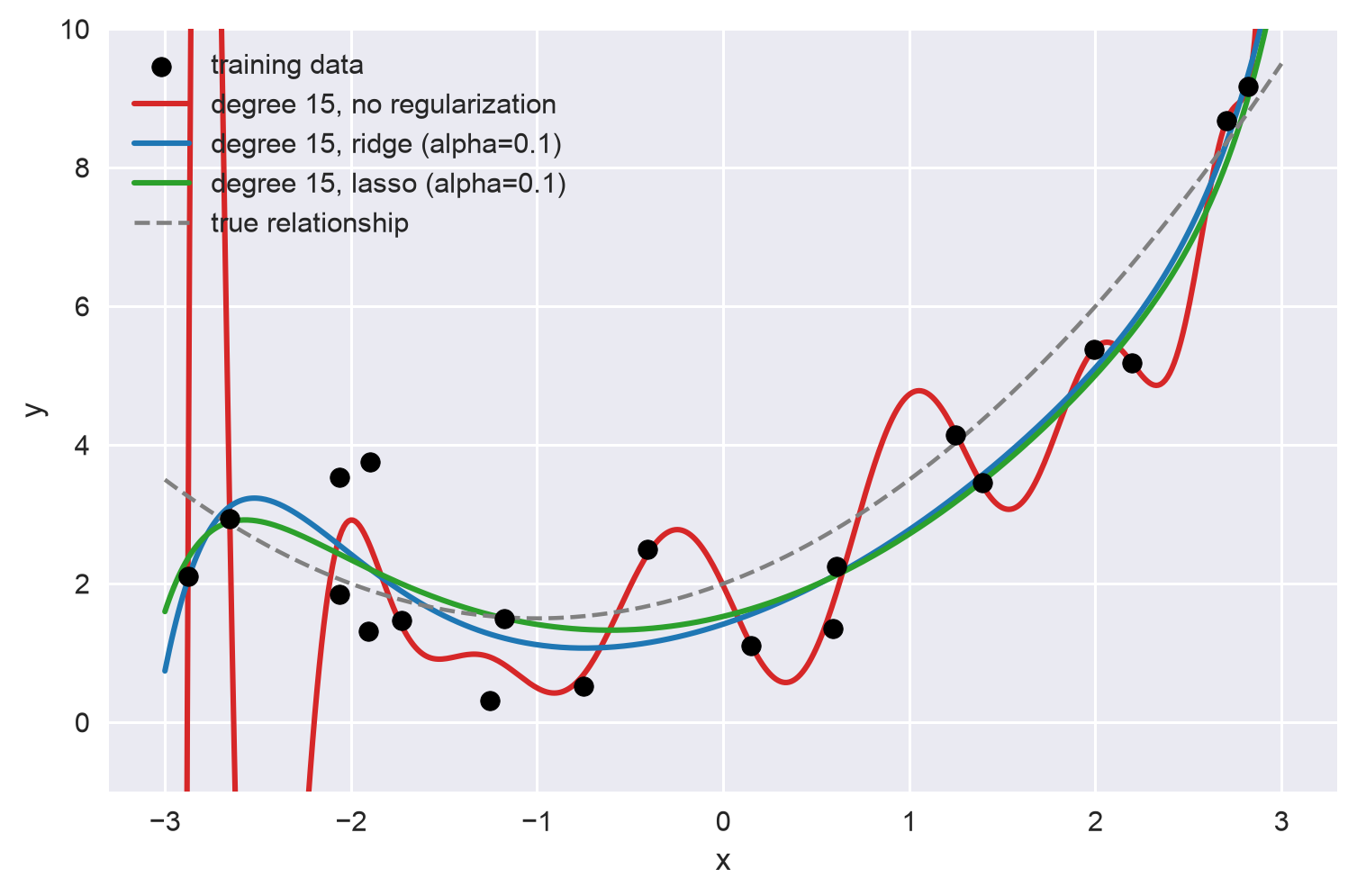
Lasso keeps only 4 of the 15 features, and the two largest weights belong to and — exactly the features in the true relationship. This makes a lasso model easier to explain: its zero weights tell you which features don't matter (compare with Feature Importance).
Both regularized models follow the true relationship closely, while the unregularized model swings wildly:
Ridge or Lasso?
- Ridge is a good default: it shrinks all weights but keeps every feature.
- Lasso is useful when you suspect only a few features matter, because it drops the rest.
- Elastic Net (
ElasticNetin scikit-learn) mixes the two penalties, with a ratio you choose.
Regularization in Other Models
You have met regularization before, under different names:
- Decision trees: pruning with
max_depthorccp_alpha - SGDRegressor: the
SGDRegressorin the Gradient Descent lecture is regularized by default — itspenaltyparameter defaults to'l2'(ridge) withalpha=0.0001 - Early stopping: when training with gradient descent, stop as soon as the error on validation data stops improving, before the model starts to overfit
- Logistic regression and SVM: in the next two lectures, the hyperparameter
CofLogisticRegressionand of a support vector machine controls regularization too — but in the opposite direction from : a smallerCmeans stronger regularization
Appendix: Plotting Code
The code below draws the two figures on this page. Run it after the code above, since it uses X_train and y_train. Try other degrees and alpha values to see how the curves change.
from sklearn.linear_model import LinearRegression, Ridge, Lasso

def fit_poly(degree, model):
    """Fit a polynomial model of the given degree with scaled features."""
    return Pipeline([
        ('poly', PolynomialFeatures(degree=degree, include_bias=False)),
        ('scaler', StandardScaler()),
        ('model', model),
    ]).fit(X_train, y_train)

# 500 evenly spaced x values between -3 and 3, to draw smooth curves
x_plot = np.linspace(-3, 3, 500).reshape(-1, 1)

# figure 1: polynomials of degree 1, 2, and 15
fig, ax = plt.subplots(figsize=(8, 5))
ax.scatter(X_train, y_train, color='black', zorder=3, label='training data')
for degree, color in [(1, 'tab:blue'), (2, 'tab:green'), (15, 'tab:red')]:
    model = fit_poly(degree, LinearRegression())
    ax.plot(x_plot, model.predict(x_plot), color=color, linewidth=2, label=f'degree {degree}')
ax.set_ylim(-1, 10)  # the degree 15 curve shoots far off the chart near the edges
ax.set_xlabel('x')
ax.set_ylabel('y')
ax.legend(loc='upper left')

# figure 2: the degree 15 model with and without regularization
fig, ax = plt.subplots(figsize=(8, 5))
ax.scatter(X_train, y_train, color='black', zorder=3, label='training data')
ax.plot(x_plot, fit_poly(15, LinearRegression()).predict(x_plot),
        color='tab:red', linewidth=2, label='degree 15, no regularization')
ax.plot(x_plot, fit_poly(15, Ridge(alpha=0.1)).predict(x_plot),
        color='tab:blue', linewidth=2, label='degree 15, ridge (alpha=0.1)')
ax.plot(x_plot, fit_poly(15, Lasso(alpha=0.1)).predict(x_plot),
        color='tab:green', linewidth=2, label='degree 15, lasso (alpha=0.1)')
ax.plot(x_plot, 0.5 * x_plot ** 2 + x_plot + 2,
        color='gray', linestyle='--', linewidth=1.5, label='true relationship')
ax.set_ylim(-1, 10)
ax.set_xlabel('x')
ax.set_ylabel('y')
ax.legend(loc='upper left')
Gradient Descent
Gradient Descent (GD) is a generic optimization algorithm that can be applied to a wide range of problems. Note that GD is not a model: it is a training…
Logistic Regression
Logistic regression (also called logit regression) estimates the probability that an instance belongs to a class — such as the probability that a customer…