
Logistic Regression
Logistic regression (also called logit regression) estimates the probability that an instance belongs to a class — such as the probability that a customer churns or that a passenger survived. Despite its name, logistic regression is used for classification, not regression.
In this lecture, we see how logistic regression turns the linear regression model into a probability, how it is trained with the log loss cost function, and how to use it on the Titanic data.
Dataset
We use the Titanic data from the Model Evaluation lecture: titanic.csv.zip. Unzip it into your ml4biz folder and run the code below in a notebook there — all the packages are already installed.
From Linear Regression to a Probability
Recall that linear regression predicts a weighted sum of the features:
This can be any number, but a probability must be between 0 and 1. Logistic regression computes the same weighted sum, (often called the logit), and passes it through the logistic function — a sigmoid (S-shaped) function that squeezes any number into the range 0 to 1:
is Euler's number, about 2.718 (more about ). The output is the estimated probability that the instance belongs to class 1:
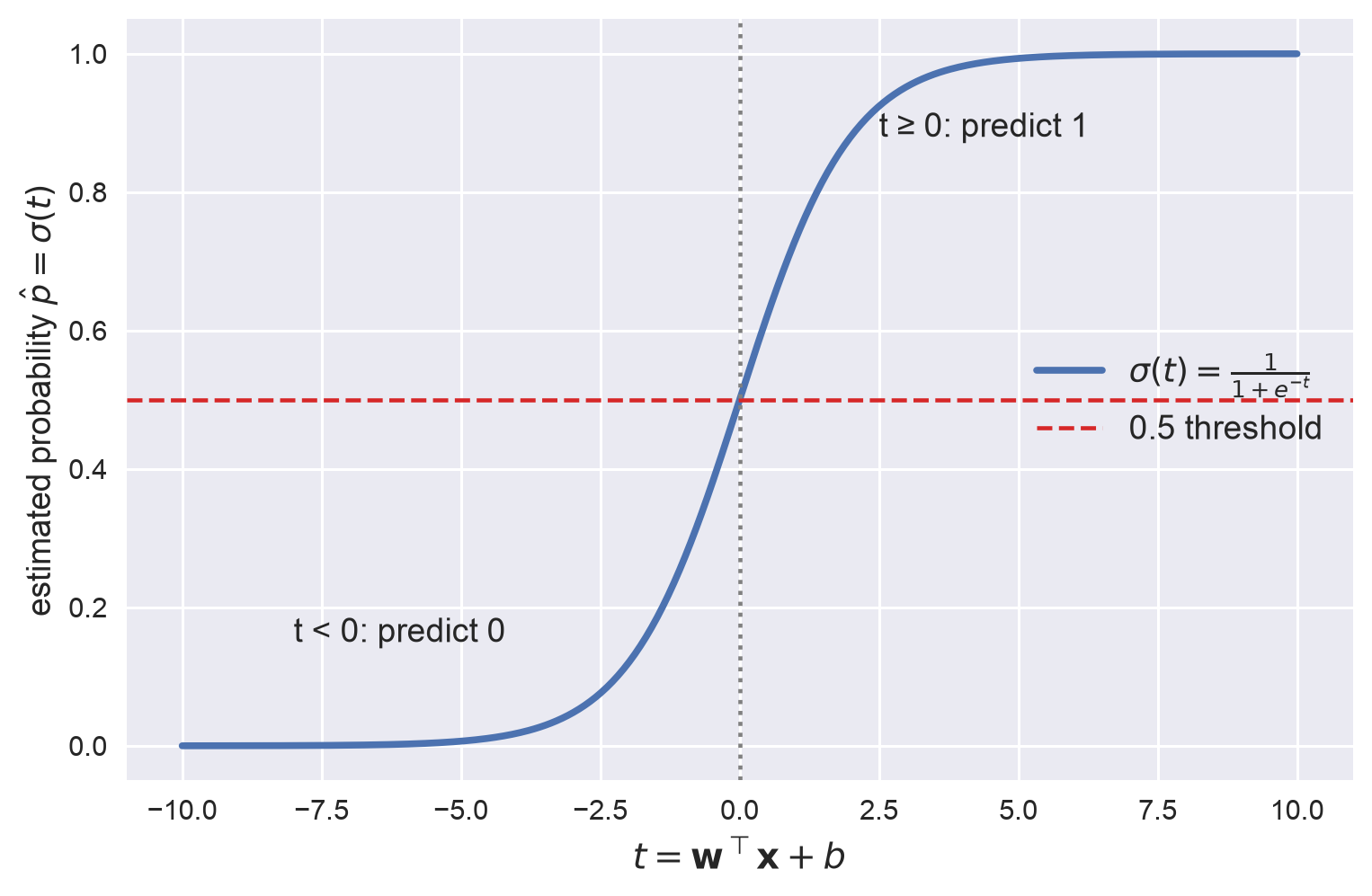
The code for the figures on this page is in the Appendix.
Making a Prediction
Using the estimated probability, logistic regression predicts the class as follows:
Because exactly when , logistic regression predicts 1 when is positive and 0 when it is negative.
The points where form the decision boundary, and it is a straight line (or a plane or hyperplane with more features). That is why logistic regression is a linear model — see What Does "Linear" Mean?. The farther a point is from the boundary, the more confident the prediction:
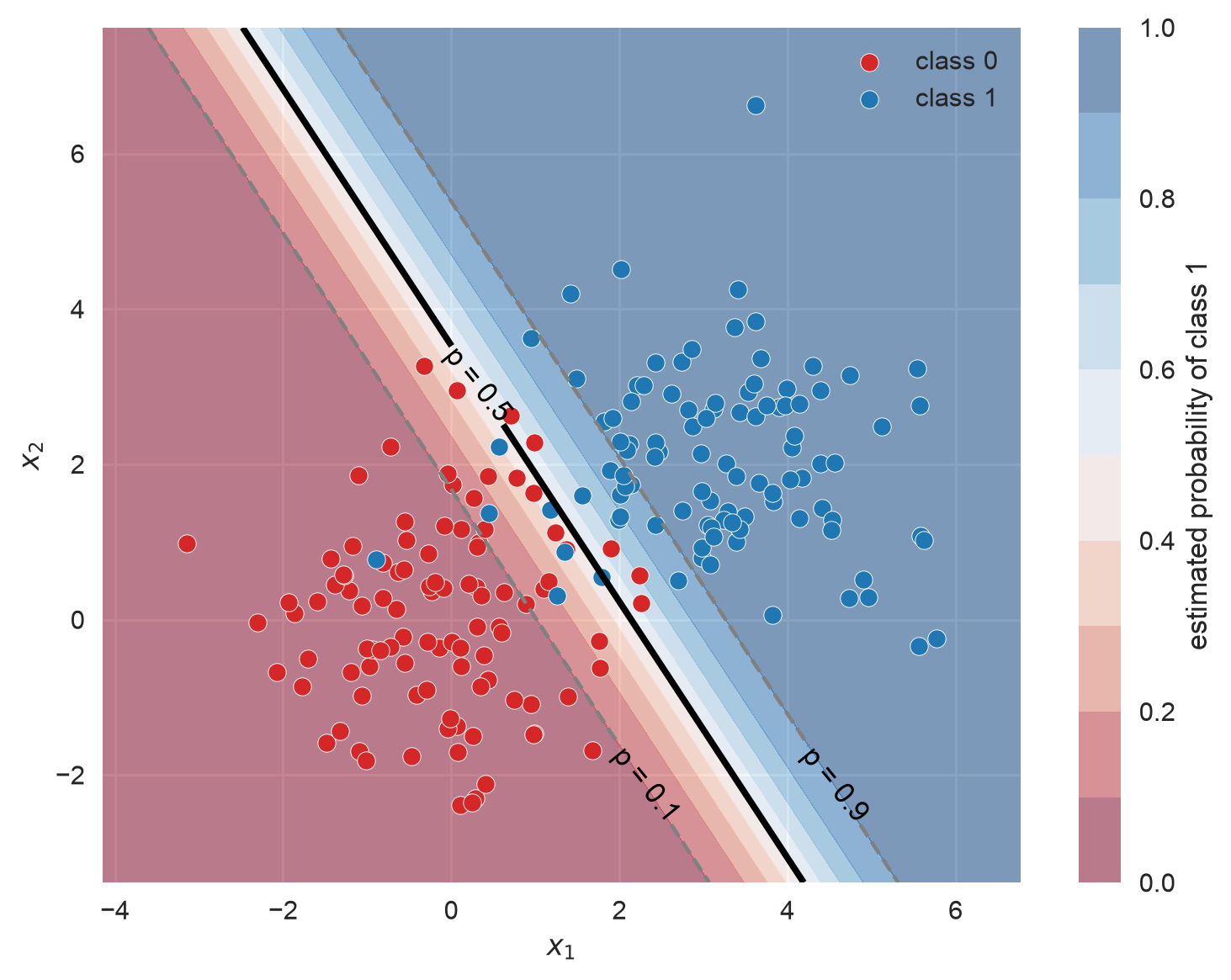
0.5 is the default threshold. You can choose a different one when the two kinds of errors have different costs — see Precision-Recall Trade-off and ROC/AUC.
Log Loss
To train the model, we need a cost function. The cost of one instance is:
This cost function says:
- if , the cost is lower the closer is to 1
- if , the cost is lower the closer is to 0
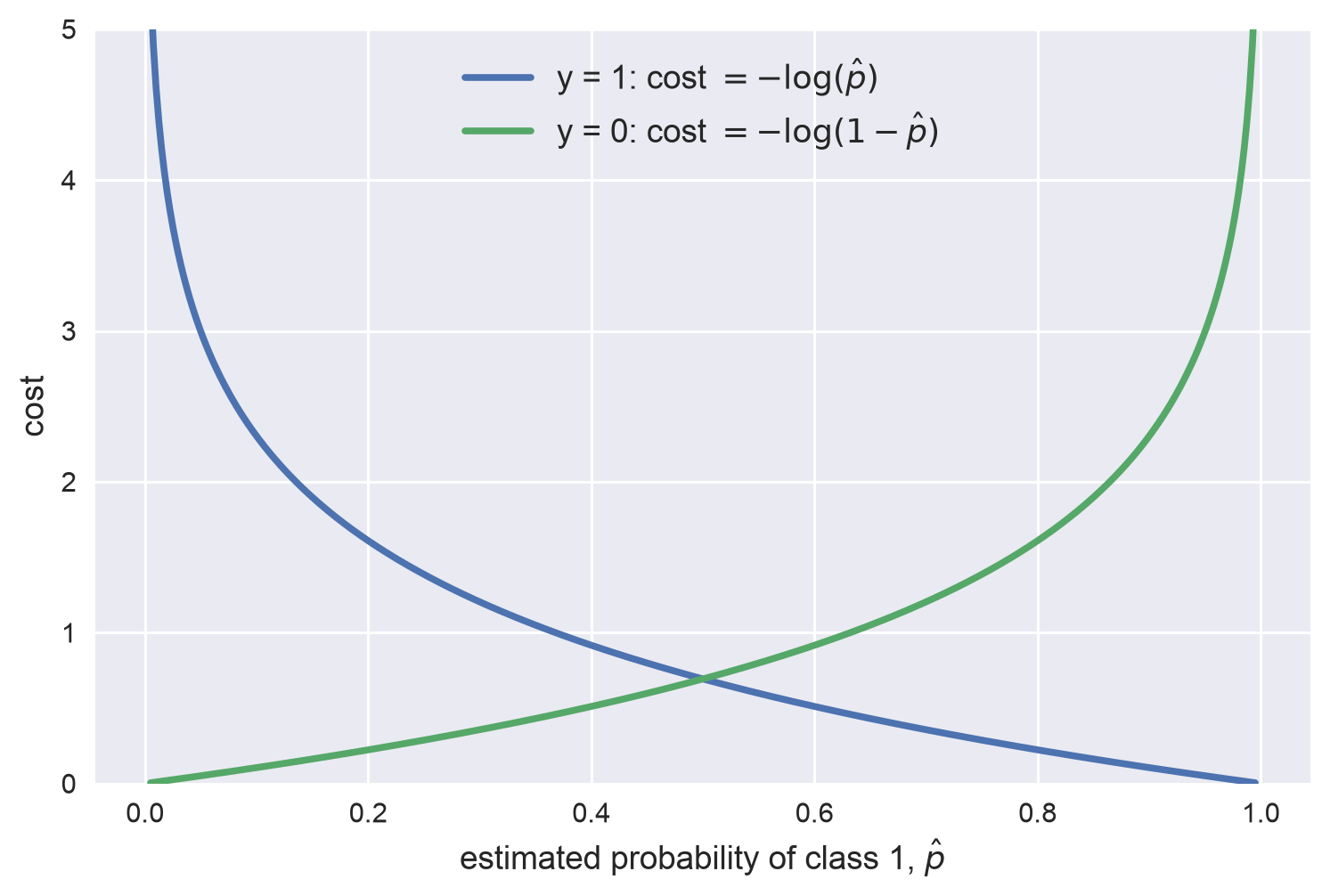
The cost grows without limit as the model becomes confidently wrong, so it heavily penalizes confident mistakes: predicting a 1% chance of survival for a passenger who survived costs , while predicting 40% costs only .
The cost function over the whole training set is the average cost over all training instances, which is called log loss (also called logistic loss or cross-entropy loss):
Log loss is one of the most important classification metrics based on probabilities, and many Kaggle competitions use it. A lower log loss is better. scikit-learn computes it from the true labels and the predicted probabilities:
from sklearn.metrics import log_loss

# true labels, predicted probabilities for [ham, spam], and the class order
print(log_loss(['spam', 'ham', 'ham', 'spam'], [[0.1, 0.9], [0.9, 0.1], [0.8, 0.2], [0.35, 0.65]], labels=['ham', 'spam']))

Output:
0.21616187468057912
Training with Gradient Descent
Unlike linear regression, there is no "closed-form" equation like the normal equation for the and that minimize log loss. But log loss is convex (shaped like a bowl), so gradient descent is guaranteed to find the global minimum. The partial derivatives of log loss are:
Compare this with the gradient of MSE for linear regression: it has the same form (apart from a constant factor), with the prediction replaced by the probability — the error times the feature value, averaged over all instances. The partial derivative for the bias is the same, without the factor.
Regularization
scikit-learn's LogisticRegression is regularized by default: its hyperparameter C (default 1.0) controls a ridge (L2) penalty. Like C in the support vector machine, a smaller C means stronger regularization — the opposite of in ridge and lasso regression. Setting l1_ratio=1 switches to a lasso (L1) penalty. Because the penalty depends on the size of the weights, scale the features first.
Titanic Example
We use the full pipeline from the Full Pipeline page, with logistic regression as the model. First, prepare the data:
import pandas as pd
from sklearn.model_selection import train_test_split

df = pd.read_csv('titanic.csv')
X = df.drop(['Survived', 'PassengerId', 'Name', 'Ticket', 'Cabin'], axis=1)
y = df['Survived']
X_train, X_test, y_train, y_test = train_test_split(X, y, test_size=0.2, random_state=42)
Build the full pipeline: fill the missing values, scale the numerical features, one-hot encode the categorical features, and attach the logistic regression model:
from sklearn.pipeline import Pipeline
from sklearn.impute import SimpleImputer
from sklearn.preprocessing import StandardScaler, OneHotEncoder
from sklearn.compose import ColumnTransformer
from sklearn.linear_model import LogisticRegression

num_features = ['Age', 'SibSp', 'Fare', 'Parch']
cat_features = ['Sex', 'Embarked', 'Pclass']

num_pipeline = Pipeline(steps=[
    ('num_imputer', SimpleImputer(strategy='mean')),
    ('scaler', StandardScaler()),
])
cat_pipeline = Pipeline(steps=[
    ('cat_imputer', SimpleImputer(strategy='most_frequent')),
    ('onehot', OneHotEncoder(handle_unknown='ignore')),
])
preprocessor = ColumnTransformer(transformers=[
    ('num', num_pipeline, num_features),
    ('cat', cat_pipeline, cat_features),
])
log_reg_pipeline = Pipeline(steps=[
    ('preprocessor', preprocessor),
    ('log_reg', LogisticRegression()),
])
Estimate the accuracy with 10-fold cross validation on the training set:
from sklearn.model_selection import cross_val_score

scores = cross_val_score(log_reg_pipeline, X_train, y_train, scoring='accuracy', cv=10)
print(f'cross validation average accuracy: {scores.mean():.3f}')

Output:
cross validation average accuracy: 0.799
Train the final model on all the training data and test it:
from sklearn.metrics import accuracy_score

log_reg_pipeline.fit(X_train, y_train)
y_pred = log_reg_pipeline.predict(X_test)
print(f'test accuracy: {accuracy_score(y_test, y_pred):.3f}')

Output:
test accuracy: 0.799
The test accuracy is close to the cross validation estimate — good.
Interpreting the Weights
Each weight tells you how a feature pushes the prediction: a positive weight raises the probability of survival, a negative weight lowers it. Use named_steps[] to reach any step of the pipeline, and get_feature_names_out() to get the feature names after one-hot encoding:
feature_names = log_reg_pipeline.named_steps['preprocessor'].get_feature_names_out()
weights = pd.Series(log_reg_pipeline.named_steps['log_reg'].coef_[0], index=feature_names)
print('intercept:', log_reg_pipeline.named_steps['log_reg'].intercept_.round(3))
print(weights.sort_values(ascending=False).round(3))

Output:
intercept: [0.117]
cat__Sex_female    1.365
cat__Pclass_1      0.770
cat__Pclass_2      0.270
cat__Embarked_C    0.237
num__Fare          0.185
cat__Embarked_Q    0.094
num__Parch        -0.105
cat__Embarked_S   -0.240
num__SibSp        -0.342
num__Age          -0.381
cat__Pclass_3     -0.949
cat__Sex_male     -1.274
dtype: float64
Being female and traveling in first class raise the probability of survival the most; being male and traveling in third class lower it the most. Older passengers and passengers with more siblings or spouses on board were also less likely to survive. Because the numerical features are scaled, their weights are comparable. This makes logistic regression easy to explain — compare with Feature Importance for decision trees.
Probabilities and Log Loss
predict_proba() returns the estimated probability of each class. The columns follow the order in classes_: here the first column is class 0 (died) and the second is class 1 (survived):
print(log_reg_pipeline.classes_)
print(log_reg_pipeline.predict_proba(X_test[:3]).round(3))
print(log_reg_pipeline.predict(X_test[:3]))
print(y_test[:3].values)

Output:
[0 1]
[[0.895 0.105]
 [0.739 0.261]
 [0.875 0.125]]
[0 0 0]
[1 0 0]
The model gives the first passenger only a 10.5% chance of survival, so it predicts 0 — but this passenger survived. That confident mistake dominates the log loss of these three passengers, which is much higher than the log loss of the whole test set:
y_pred_proba = log_reg_pipeline.predict_proba(X_test)
print(f'log loss on the first three passengers: {log_loss(y_test[:3], y_pred_proba[:3], labels=[0, 1]):.3f}')
print(f'log loss on the whole test set: {log_loss(y_test, y_pred_proba):.3f}')

Output:
log loss on the first three passengers: 0.897
log loss on the whole test set: 0.425
LogisticRegression also handles more than two classes: it then estimates one probability per class (called softmax or multinomial logistic regression), and predicts the class with the highest probability.
Appendix: Plotting Code
The code below draws the three figures on this page. It is self-contained.
import numpy as np
import matplotlib.pyplot as plt
from sklearn.datasets import make_blobs
from sklearn.linear_model import LogisticRegression
plt.style.use('seaborn-v0_8')

# figure 1: the sigmoid (logistic) function
t = np.linspace(-10, 10, 400)
fig, ax = plt.subplots(figsize=(8, 5))
ax.plot(t, 1 / (1 + np.exp(-t)), linewidth=2.5, label=r'$\sigma(t) = \frac{1}{1 + e^{-t}}$')
ax.axhline(0.5, color='tab:red', linestyle='--', linewidth=1.5, label='0.5 threshold')
ax.axvline(0, color='gray', linestyle=':', linewidth=1.5)
ax.annotate('t < 0: predict 0', xy=(-8, 0.15), fontsize=12)
ax.annotate('t ≥ 0: predict 1', xy=(2.5, 0.88), fontsize=12)
ax.set_xlabel(r'$t = \mathbf{w}^\top \mathbf{x} + b$', fontsize=13)
ax.set_ylabel(r'estimated probability $\hat p = \sigma(t)$', fontsize=12)
ax.legend(loc='center right', fontsize=12)

# figure 2: the cost of one instance, depending on its true label
p_hat = np.linspace(0.005, 0.995, 400)
fig, ax = plt.subplots(figsize=(8, 5))
ax.plot(p_hat, -np.log(p_hat), linewidth=2.5, label=r'y = 1: cost $= -\log(\hat p)$')
ax.plot(p_hat, -np.log(1 - p_hat), linewidth=2.5, label=r'y = 0: cost $= -\log(1 - \hat p)$')
ax.set_xlabel(r'estimated probability of class 1, $\hat p$', fontsize=12)
ax.set_ylabel('cost', fontsize=12)
ax.set_ylim(0, 5)
ax.legend(loc='upper center', fontsize=12)

# figure 3: a logistic regression decision boundary on two features
X, y = make_blobs(n_samples=200, centers=[[0, 0], [3, 2]], cluster_std=1.2, random_state=42)  # two overlapping classes
log_reg = LogisticRegression().fit(X, y)
x1, x2 = np.meshgrid(np.linspace(X[:, 0].min() - 1, X[:, 0].max() + 1, 300),
                     np.linspace(X[:, 1].min() - 1, X[:, 1].max() + 1, 300))
proba = log_reg.predict_proba(np.c_[x1.ravel(), x2.ravel()])[:, 1].reshape(x1.shape)

fig, ax = plt.subplots(figsize=(8, 6))
contour = ax.contourf(x1, x2, proba, levels=np.linspace(0, 1, 11), cmap='RdBu', alpha=0.5)
lines = ax.contour(x1, x2, proba, levels=[0.1, 0.5, 0.9], colors=['gray', 'black', 'gray'],
                   linestyles=['--', '-', '--'], linewidths=[1.5, 2.5, 1.5])
ax.clabel(lines, fmt={0.1: 'p = 0.1', 0.5: 'p = 0.5', 0.9: 'p = 0.9'}, fontsize=11, colors='black')
ax.scatter(X[y == 0, 0], X[y == 0, 1], color='tab:red', edgecolor='white', label='class 0')
ax.scatter(X[y == 1, 0], X[y == 1, 1], color='tab:blue', edgecolor='white', label='class 1')
fig.colorbar(contour, ax=ax, label='estimated probability of class 1')
ax.set_xlabel('$x_1$')
ax.set_ylabel('$x_2$')
ax.legend(loc='upper right')
Polynomial Regression and Regularization
A decision tree that grows too deep overfits, and we fix it by pruning — limiting how complex the tree may become. That fix is called regularization (see…
Support Vector Machine
The Support Vector Machine (SVM) is one of the most powerful and versatile ML models, and it can handle both classification and regression. In this lecture…