
Support Vector Machine
The Support Vector Machine (SVM) is one of the most powerful and versatile ML models, and it can handle both classification and regression. In this lecture, we cover:
- Linear SVM classification
- Non-linear SVM classification, using feature transformations and kernels
- SVM regression
Datasets
- iris.csv.zip — measurements of 150 iris flowers of three types, used to illustrate linear SVM classification
- titanic.csv.zip — the Titanic data from the Model Evaluation lecture, used to compare SVM kernels
- housing.csv.zip — the California housing data from the Linear Regression lecture, used for SVM regression
Unzip them into your ml4biz folder and run the code below in a notebook there — all the packages are already installed.
The iris dataset has the petal and sepal measurements of three types of iris:
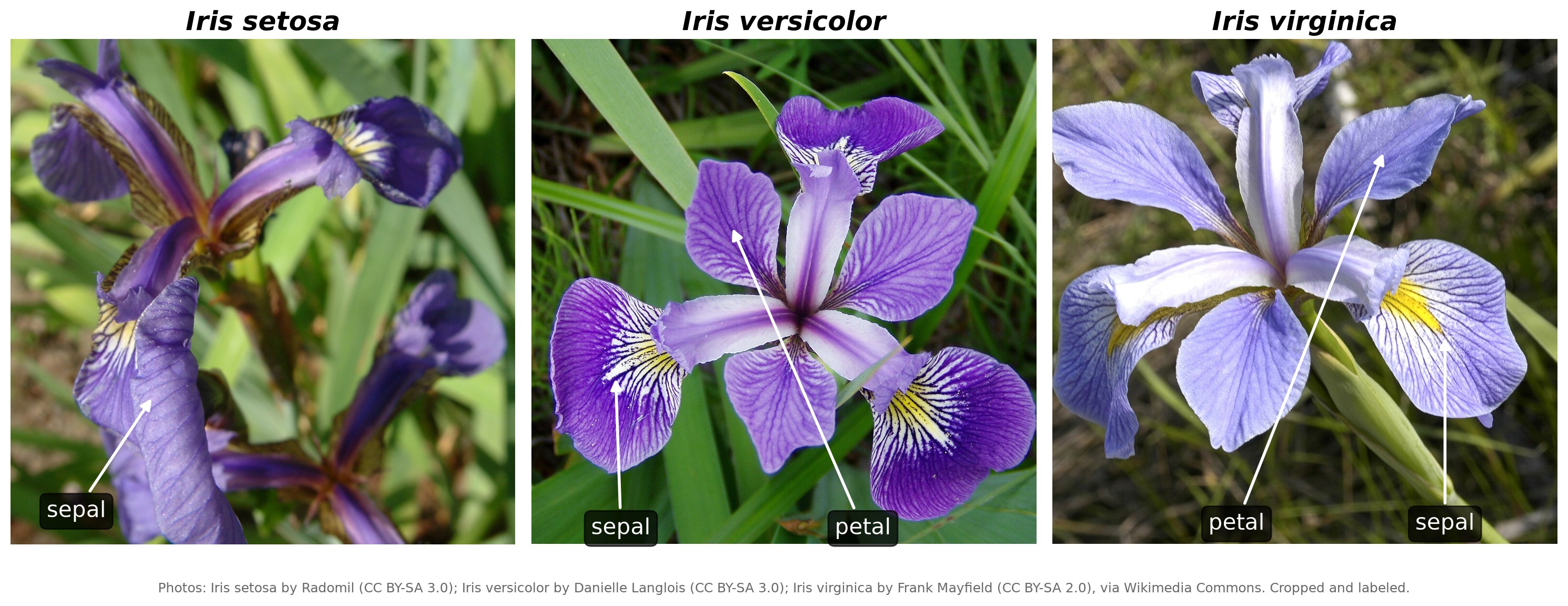
The large, drooping parts of an iris flower are its sepals, and the smaller, upright parts are its petals. Setosa's petals are so small they are hard to see — which is why setosa has much shorter petals than the other two types in the data.
Photos via Wikimedia Commons, cropped and labeled: Iris setosa by Radomil, CC BY-SA 3.0; Iris versicolor by Danielle Langlois, CC BY-SA 3.0; Iris virginica by Frank Mayfield, CC BY-SA 2.0. The combined image is shared under CC BY-SA 3.0.
import pandas as pd
import matplotlib.pyplot as plt
import seaborn as sns
plt.style.use('seaborn-v0_8')

df = pd.read_csv('iris.csv')

# print the different types of iris
print(df.type.unique())
df.head()

Output:
<ArrowStringArray>
['Iris-setosa', 'Iris-versicolor', 'Iris-virginica']
Length: 3, dtype: str
   id  sepal_length  sepal_width  petal_length  petal_width         type
0   1           5.1          3.5           1.4          0.2  Iris-setosa
1   2           4.9          3.0           1.4          0.2  Iris-setosa
2   3           4.7          3.2           1.3          0.2  Iris-setosa
3   4           4.6          3.1           1.5          0.2  Iris-setosa
4   5           5.0          3.6           1.4          0.2  Iris-setosa
We only use two types of iris, setosa and versicolor, which are linearly separable — a straight line can separate them:
df = df[df.type != 'Iris-virginica']

sns.scatterplot(data=df, x='petal_length', y='petal_width', hue='type')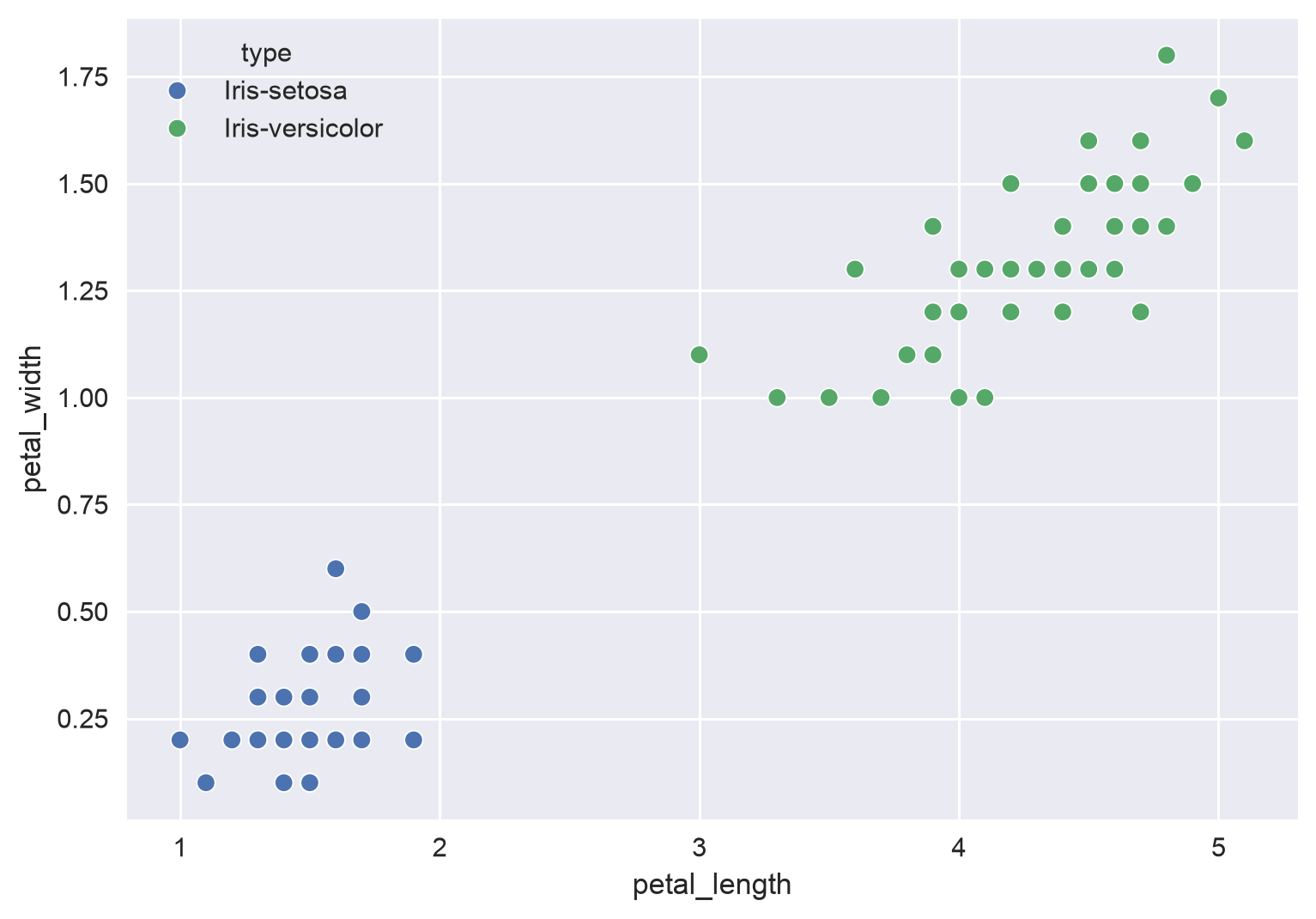
Linear SVM Classification
We first assume the data is linearly separable. Which model is better, blue or red?
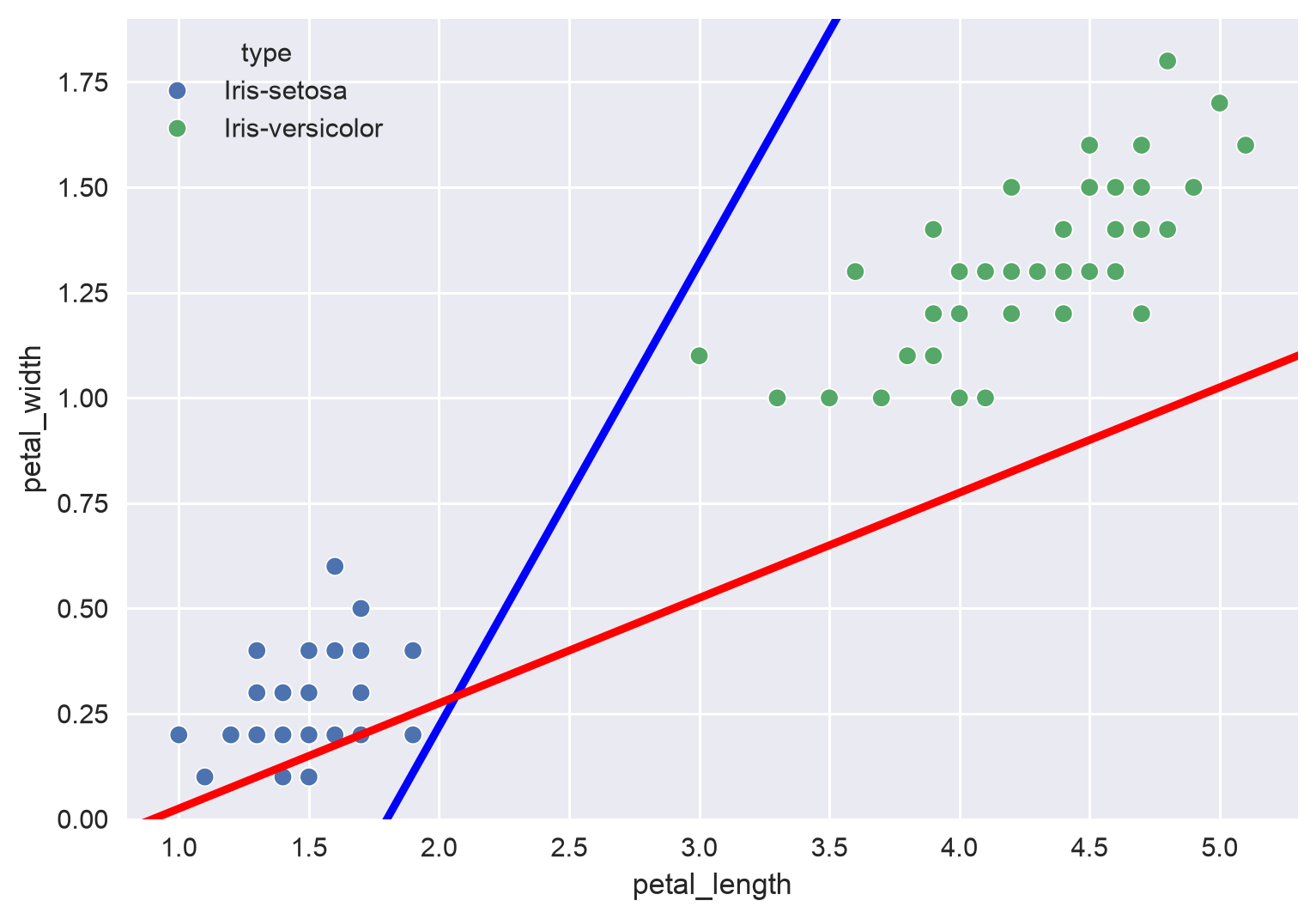
The code for the figures in this section is in the Appendix.
Here the blue line is better: the red line misclassifies some setosa flowers. Now, which model is better, blue or red?
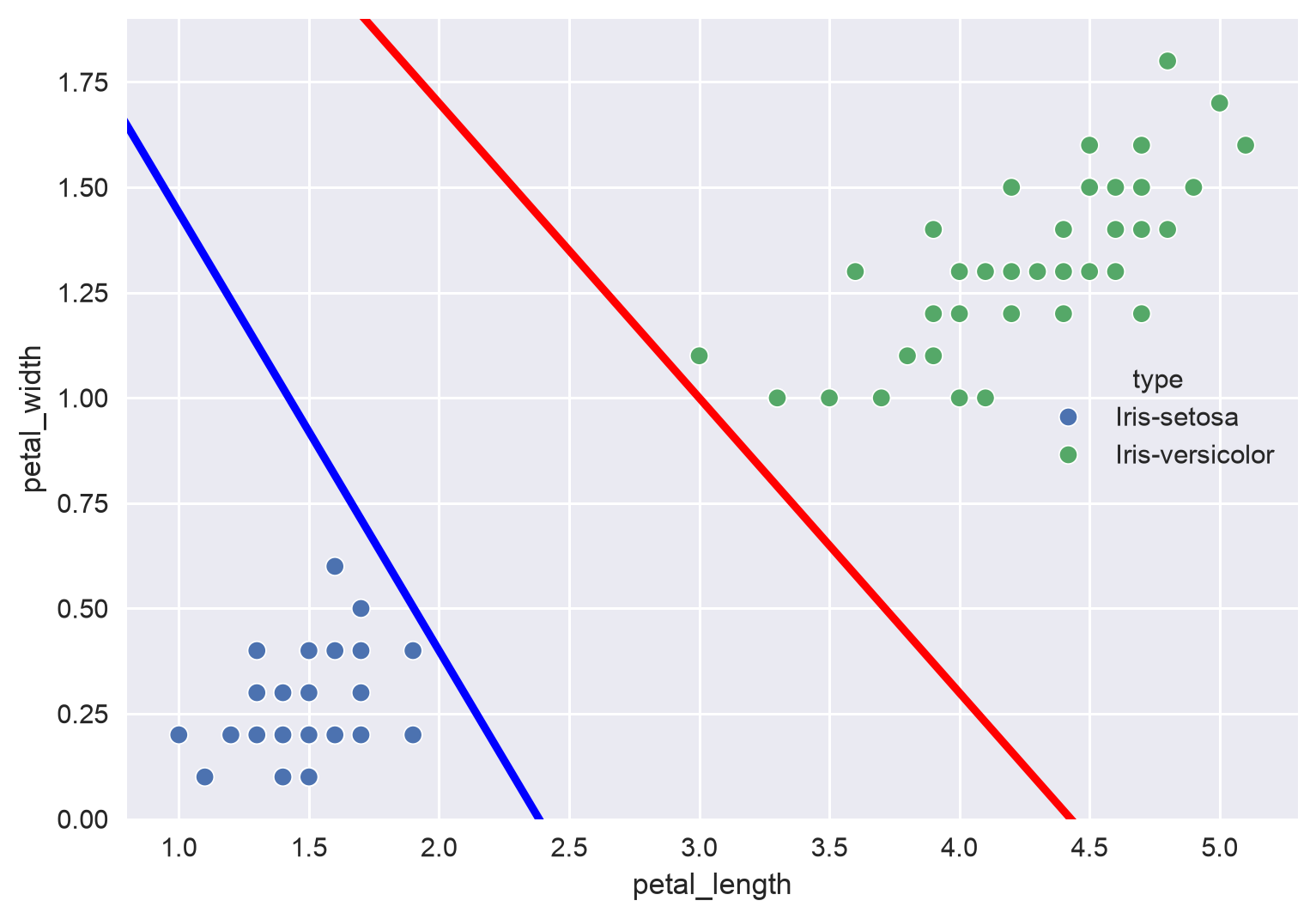
Both lines separate the training data perfectly, but each passes very close to one class: the blue line almost touches the setosa points and the red line almost touches the versicolor points. A new flower that is slightly different from the training data could easily land on the wrong side. A better line would stay as far as possible from both classes.
Large Margin Classification
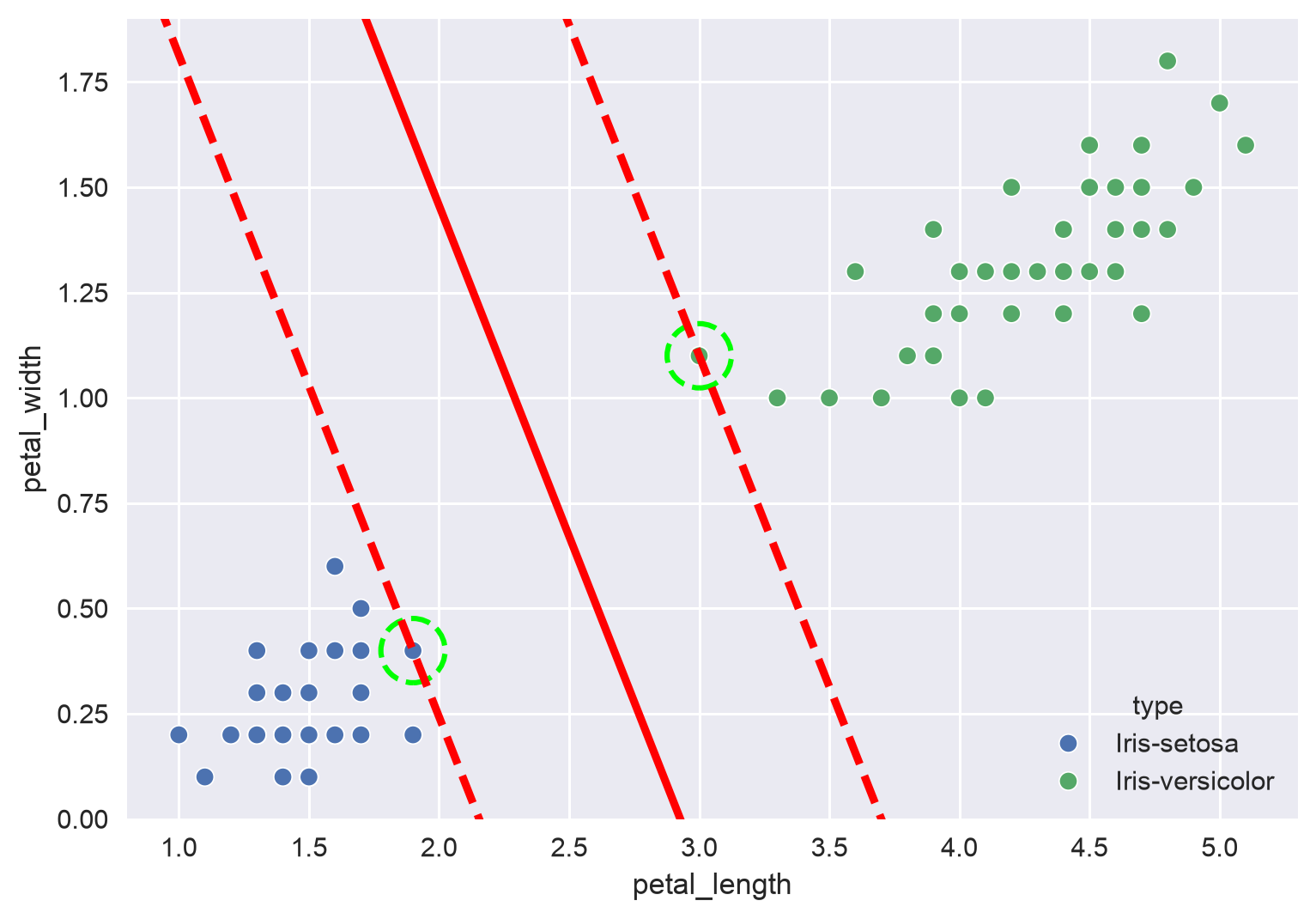
- Support vectors: the data points of each class that are closest to the boundary
- Margin: the distance between the boundary and the support vectors on either side
SVM maximizes the margin — it makes the "street" between the classes as wide as possible. A wider street leaves more room for new data points, so the model generalizes better. Only the support vectors decide where the street goes: adding more points far from the street does not change it.
- In 2D, an SVM draws a line to separate the classes.
- In 3D, an SVM uses a 2D plane to separate the data.
- In higher dimensions, it uses a so-called "hyperplane", which is hard to visualize.
Hard vs. Soft Margin Classification
-
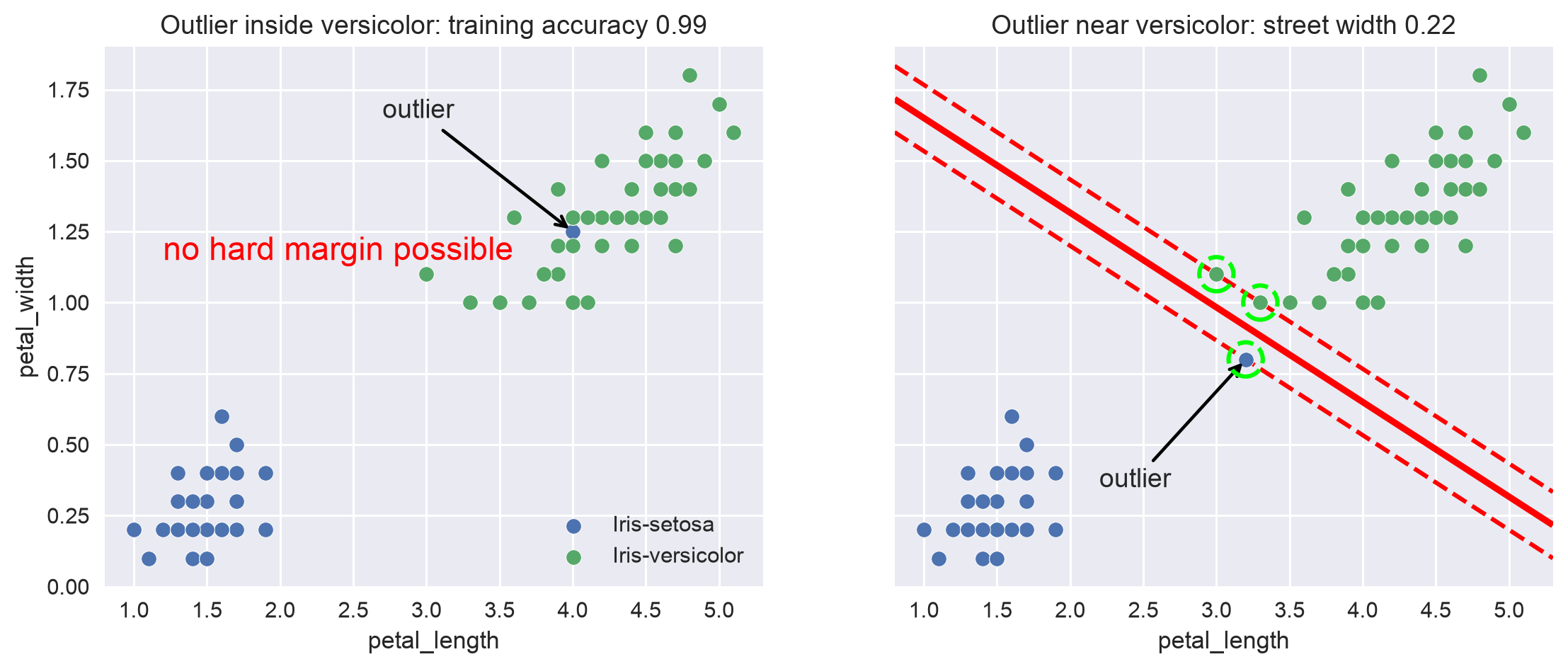
Hard margin classification does not allow any margin violations — no point may be on the street or on the wrong side — so it cannot handle outliers well, as shown below:
-
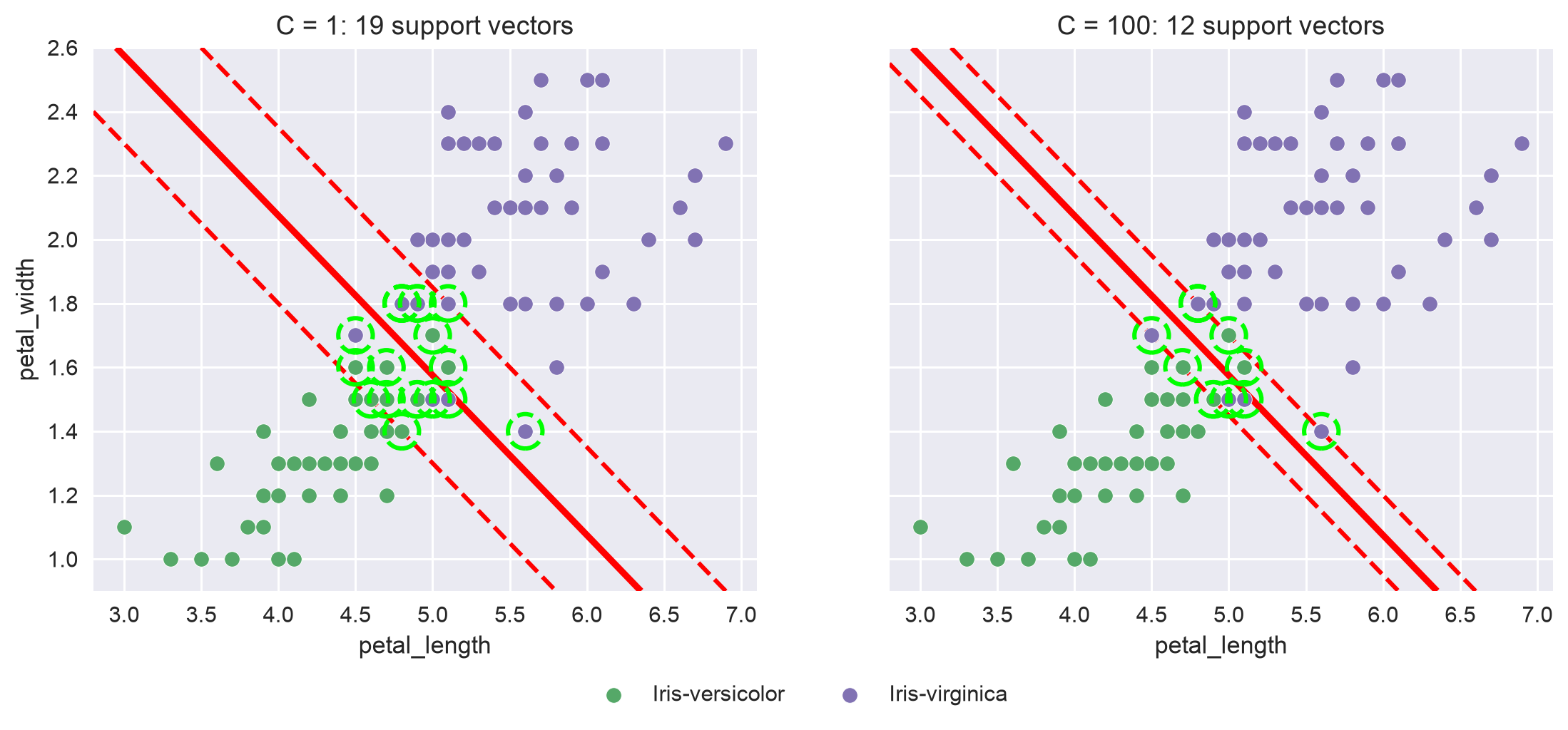
Soft margin classification allows but limits margin violations.
The scikit-learn SVC (Support Vector Classifier) has a hyperparameter C, which defines how many margin violations are allowed: the lower the value, the more violations are allowed and the wider the street (the default is C=1). A high C gives a narrow street with few violations, which can overfit; a low C gives a wide street with more violations, which often generalizes better. In other words, C is a regularization hyperparameter, like in ridge and lasso but in the opposite direction: a smaller C means stronger regularization.
Feature Scaling
Just like gradient descent, SVM is sensitive to feature scaling — the street's width is measured in feature units, so a feature with a large scale dominates. Always scale the features when using SVM, for example with the StandardScaler from the Data Preprocessing lecture.
Next, we try a linear SVM on the iris data:
from sklearn.pipeline import Pipeline
from sklearn.preprocessing import StandardScaler
from sklearn.svm import SVC
from sklearn.model_selection import train_test_split
from sklearn.metrics import accuracy_score

X = df[['petal_length', 'petal_width']]  # only use petal length and width
y = df['type']

X_train, X_test, y_train, y_test = train_test_split(X, y, test_size=0.2, random_state=42)

# build a simple pipeline to do feature scaling
linear_svc = Pipeline([
    ('scaler', StandardScaler()),
    ('linear_svc', SVC(kernel='linear', C=1)),
])

# train the model
linear_svc.fit(X_train, y_train)

# make predictions and calculate the accuracy
y_pred = linear_svc.predict(X_test)
print(f'Accuracy Score: {accuracy_score(y_test, y_pred)}')

Output:
Accuracy Score: 1.0
The two types are linearly separable, so the linear SVM classifies every test flower correctly.
Non-Linear SVM Classification
Many datasets are not linearly separable. There are two approaches:
- Transform the data, such as adding polynomial features, to make the dataset linearly separable in a higher dimension:
- a 1D dataset becomes linearly separable in 2D, using a line
- a 2D dataset becomes linearly separable in 3D, using a plane
- Use a non-linear kernel for SVM, which gets the same effect without actually adding the features
Transform the Data
The following 1D data cannot be separated by a single threshold, because the b points sit between the a points:
x = [-4, -3, -2, -1, 0, 1, 2, 3, 4]
y = [5, 5, 5, 5, 5, 5, 5, 5, 5]
type = ['a', 'a', 'b', 'b', 'b', 'b', 'b', 'a', 'a']

df = pd.DataFrame({
    'x': x,
    'y': y,
    'type': type,
})

# plot the data
sns.scatterplot(data=df, x='x', y='y', hue='type')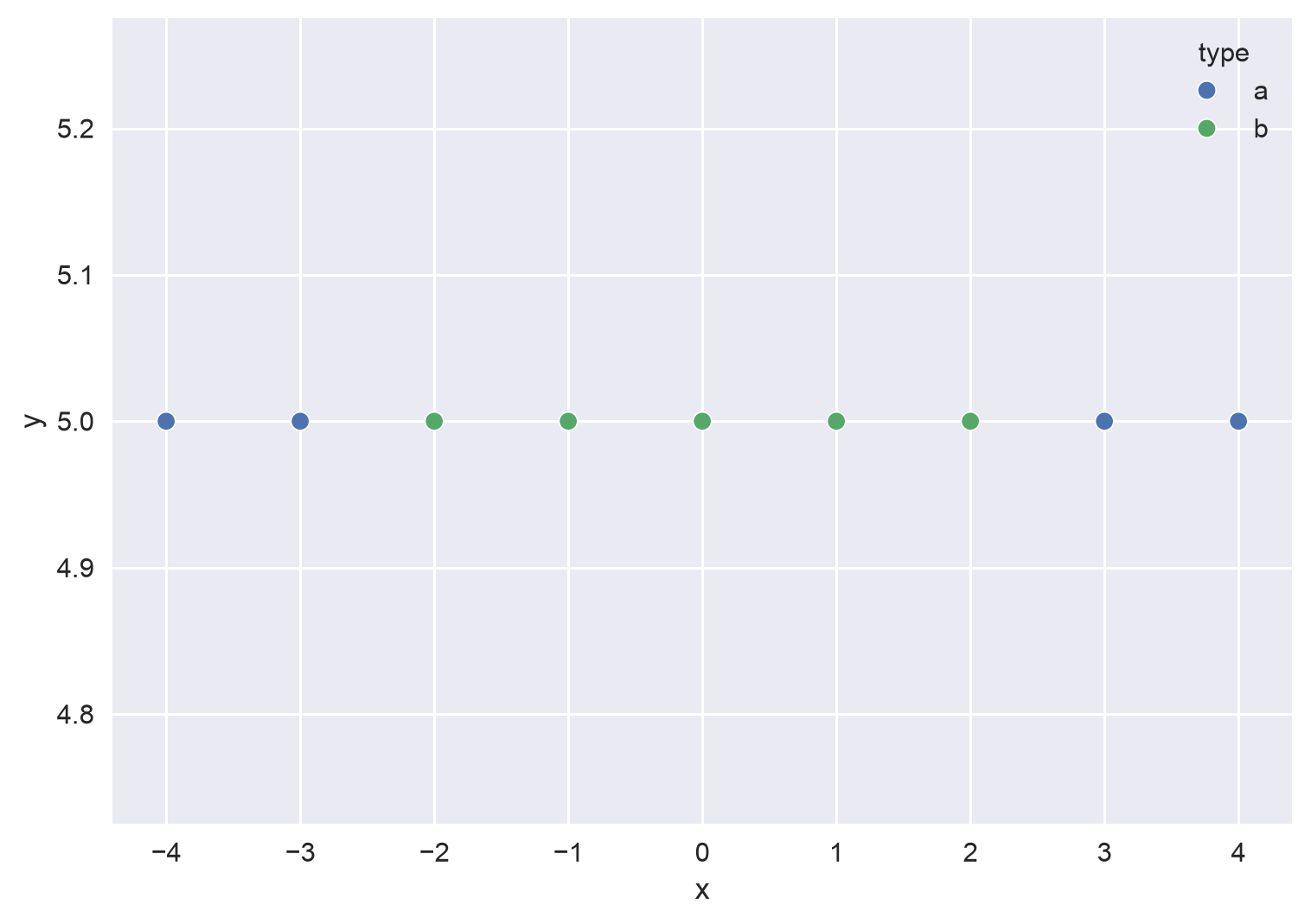
Let's add a polynomial feature :
# transform x to a polynomial feature x^2
df['y-poly'] = df.x * df.x

# now the data is linearly separable: a horizontal line separates a and b
sns.scatterplot(data=df, x='x', y='y-poly', hue='type')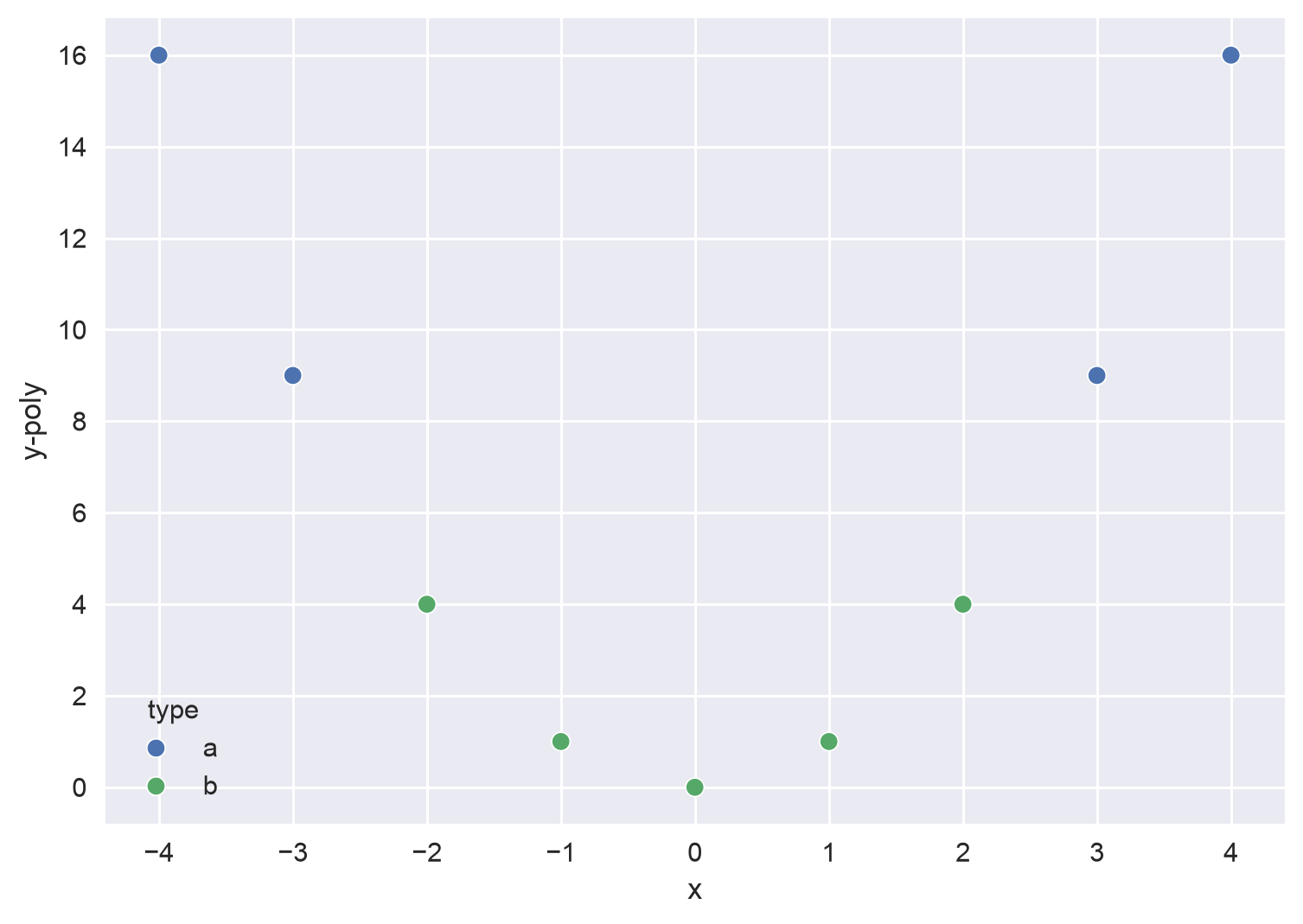
Another example — 2D data that becomes linearly separable in 3D:
# make_circles generates a toy dataset of two circles, one inside the other
from sklearn.datasets import make_circles

X, y = make_circles(n_samples=1000, noise=0.03, random_state=42)
circle = pd.DataFrame(X, columns=['x1', 'x2'])
circle['label'] = y

# no straight line can separate the inner circle from the outer one
sns.scatterplot(x='x1', y='x2', hue='label', data=circle)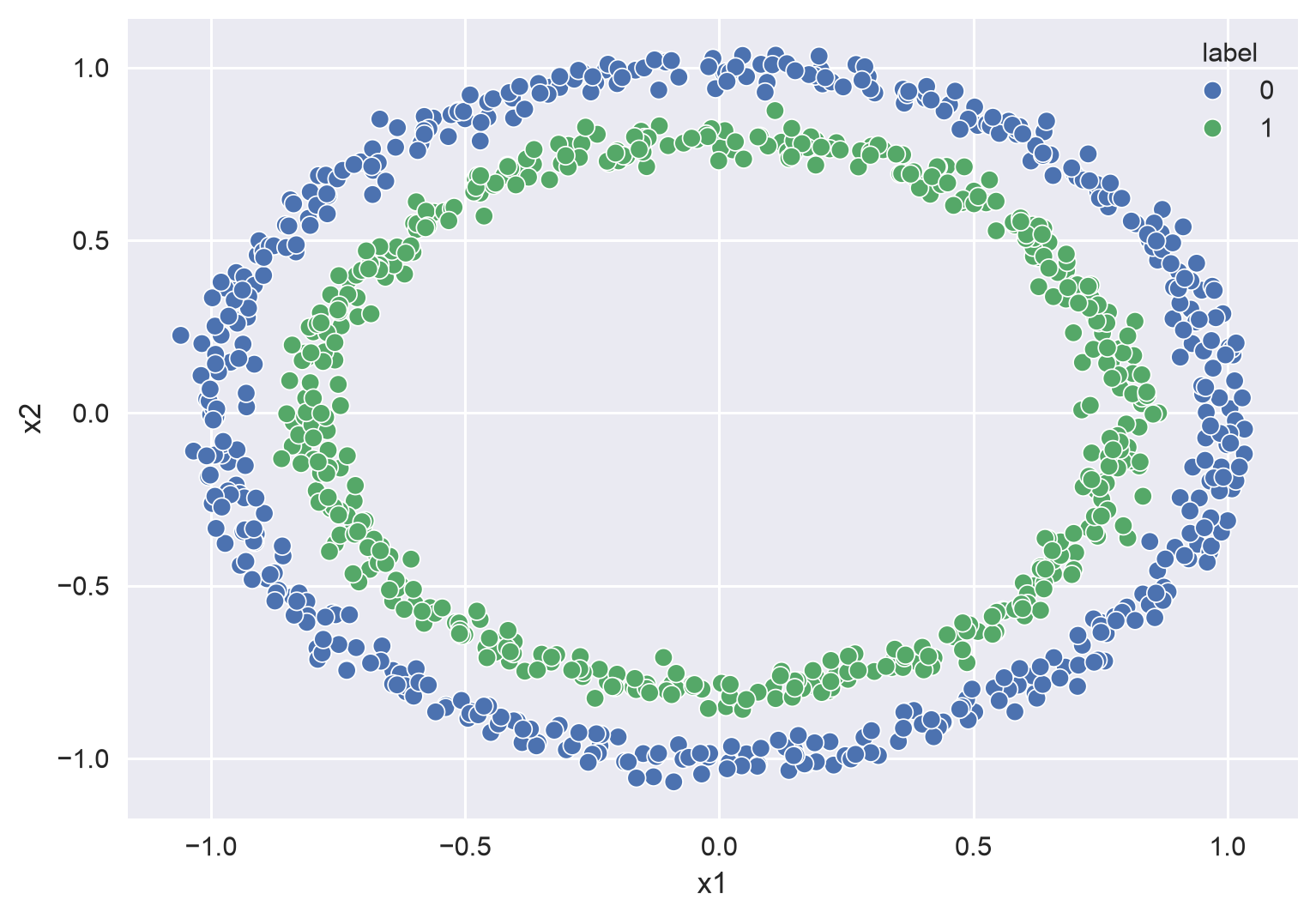
# 2nd degree polynomial transformation
from sklearn.preprocessing import PolynomialFeatures

# degree=2 adds x1^2, x1*x2, and x2^2
poly_features_2 = PolynomialFeatures(degree=2, include_bias=False)
X_poly = poly_features_2.fit_transform(X)

circle_poly = pd.DataFrame(X_poly, columns=['x1', 'x2', 'x1^2', 'x1*x2', 'x2^2'])
circle_poly['label'] = y

# plot the new features in 3D
plt.style.use('default')
fig = plt.figure(figsize=(8, 8))
ax = fig.add_subplot(111, projection='3d')

ax.scatter(circle_poly['x1^2'], circle_poly['x1*x2'], circle_poly['x2^2'], c=circle_poly['label'])
ax.set_xlabel('x1^2')
ax.set_ylabel('x1*x2')
ax.set_zlabel('x2^2')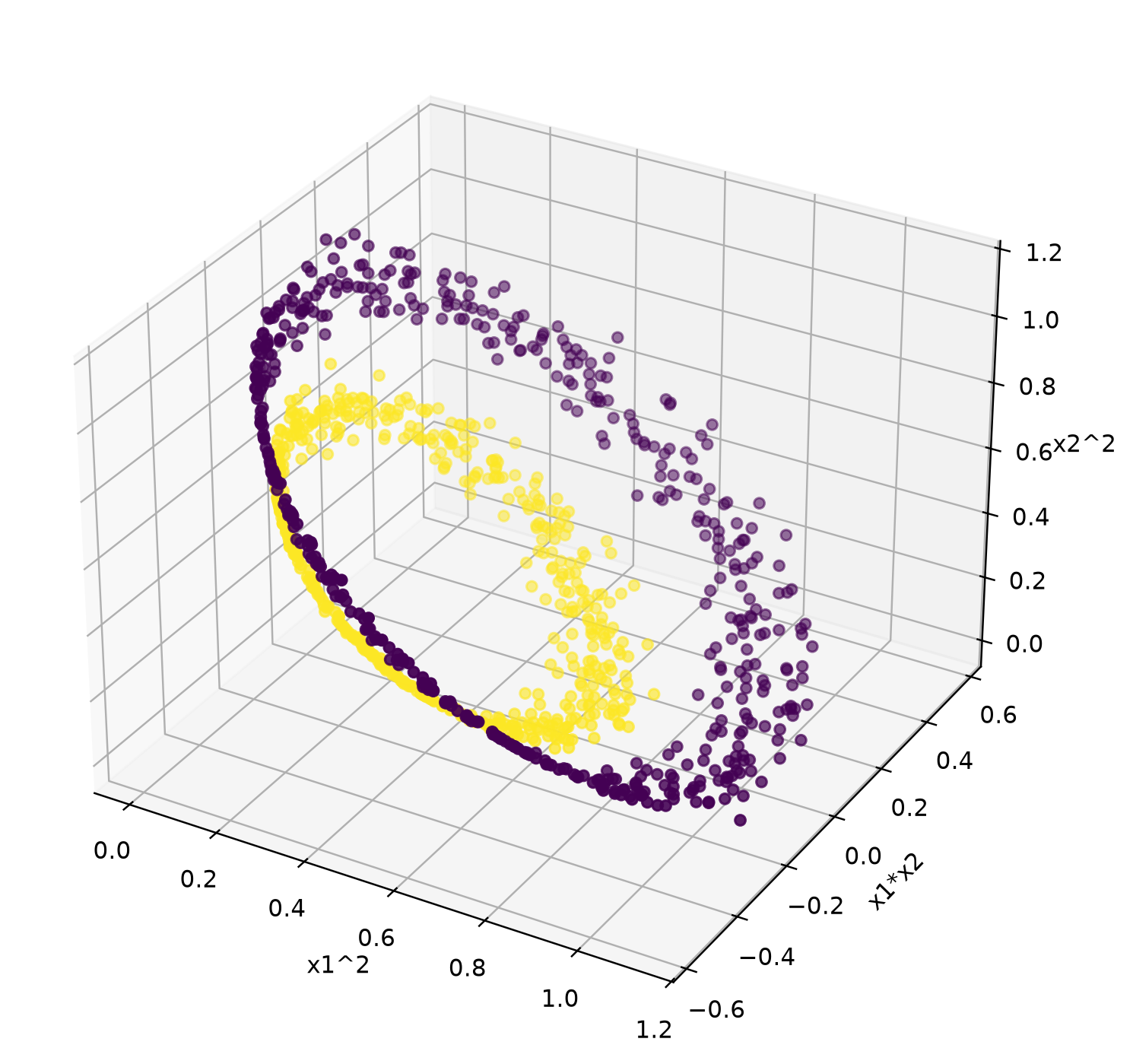
Use a Kernel
Adding features by hand gets expensive quickly: with many features and a high degree, the number of new features explodes. A kernel lets the SVM work as if those features were added, without actually computing them — this is called the kernel trick. SVC supports three common kernels with the kernel parameter:
'linear': no transformation — a straight line (or plane) boundary'poly': a polynomial transformation; thedegreeparameter sets the degree (default 3)'rbf'(the default): the Radial Basis Function kernel, which measures how similar each point is to the others and can draw very flexible boundaries
Let's try the three kernels on the circles data:
for kernel in ['linear', 'poly', 'rbf']:
    svc = Pipeline([
        ('scaler', StandardScaler()),
        ('svc', SVC(kernel=kernel, degree=2)),  # degree is only used by the poly kernel
    ])
    X_train, X_test, y_train, y_test = train_test_split(X, y, test_size=0.2, random_state=42)
    svc.fit(X_train, y_train)
    print(kernel, accuracy_score(y_test, svc.predict(X_test)))

Output:
linear 0.465
poly 1.0
rbf 1.0
The linear kernel does no better than guessing, while the polynomial (degree 2) and RBF kernels separate the circles perfectly.
The kernel also decides whether the SVM is a linear model. With the linear kernel, it is: the boundary is a straight line (or plane) in the original features. With the polynomial or RBF kernel, it is not: the boundary is straight only in the transformed feature space the kernel creates, and curved in the original features — the same idea as polynomial regression. See What Does "Linear" Mean?.
SVC with Different Kernels on the Titanic Data
On real data, we don't know which kernel works best, so we let grid search choose — together with C — using the full pipeline from the Model Evaluation lecture:
import pandas as pd
from sklearn.model_selection import train_test_split, GridSearchCV
from sklearn.pipeline import Pipeline
from sklearn.impute import SimpleImputer
from sklearn.preprocessing import StandardScaler, OneHotEncoder
from sklearn.compose import ColumnTransformer
from sklearn.svm import SVC
from sklearn.metrics import accuracy_score

# prepare the data
df = pd.read_csv('titanic.csv')
X = df.drop(['Survived', 'PassengerId', 'Name', 'Ticket', 'Cabin'], axis=1)
y = df['Survived']

# split the data into a training set and a test set
X_train, X_test, y_train, y_test = train_test_split(X, y, test_size=0.2, random_state=42)

num_features = ['Age', 'SibSp', 'Fare', 'Parch']
cat_features = ['Sex', 'Embarked', 'Pclass']

# preprocessing pipeline for numerical features
num_pipeline = Pipeline(
    steps=[
        ('num_imputer', SimpleImputer(strategy='mean')),
        ('scaler', StandardScaler()),
    ]
)

# preprocessing pipeline for categorical features
cat_pipeline = Pipeline(
    steps=[
        ('cat_imputer', SimpleImputer(strategy='most_frequent')),
        ('onehot', OneHotEncoder(handle_unknown='ignore')),
    ]
)

# combine the two pipelines to form the preprocessor
preprocessor = ColumnTransformer(
    transformers=[
        ('num_pipeline', num_pipeline, num_features),
        ('cat_pipeline', cat_pipeline, cat_features),
    ]
)

# attach the SVC model
svc_pipeline = Pipeline(
    steps=[
        ('preprocessor', preprocessor),
        ('svc', SVC()),
    ]
)

# degree only matters for the poly kernel, so it gets its own grid
param_grid = [
    {
        'svc__kernel': ['linear', 'rbf'],
        'svc__C': [0.1, 1, 10],
    },
    {
        'svc__kernel': ['poly'],
        'svc__degree': [2, 3, 5],
        'svc__C': [0.1, 1, 10],
    },
]

# set up grid search with 10-fold cross validation
svc_grid_search = GridSearchCV(svc_pipeline, param_grid, cv=10)
svc_grid_search.fit(X_train, y_train)

print('The best parameters are:', svc_grid_search.best_params_)
print(f'The best cross validation accuracy is: {svc_grid_search.best_score_:.3f}')

# test the best model on the test set
svc_best = svc_grid_search.best_estimator_
y_pred = svc_best.predict(X_test)
print(f'Accuracy Score: {accuracy_score(y_test, y_pred):.3f}')

Output:
The best parameters are: {'svc__C': 10, 'svc__degree': 2, 'svc__kernel': 'poly'}
The best cross validation accuracy is: 0.825
Accuracy Score: 0.821
SVM Regression
SVM can also handle regression, by sort of reversing the objective of classification:
- SVM classification: fit the widest possible street while keeping as many instances as possible off the street
- SVM regression: fit a street that puts as many instances as possible on the street. The width of the street is controlled by a hyperparameter called (epsilon)
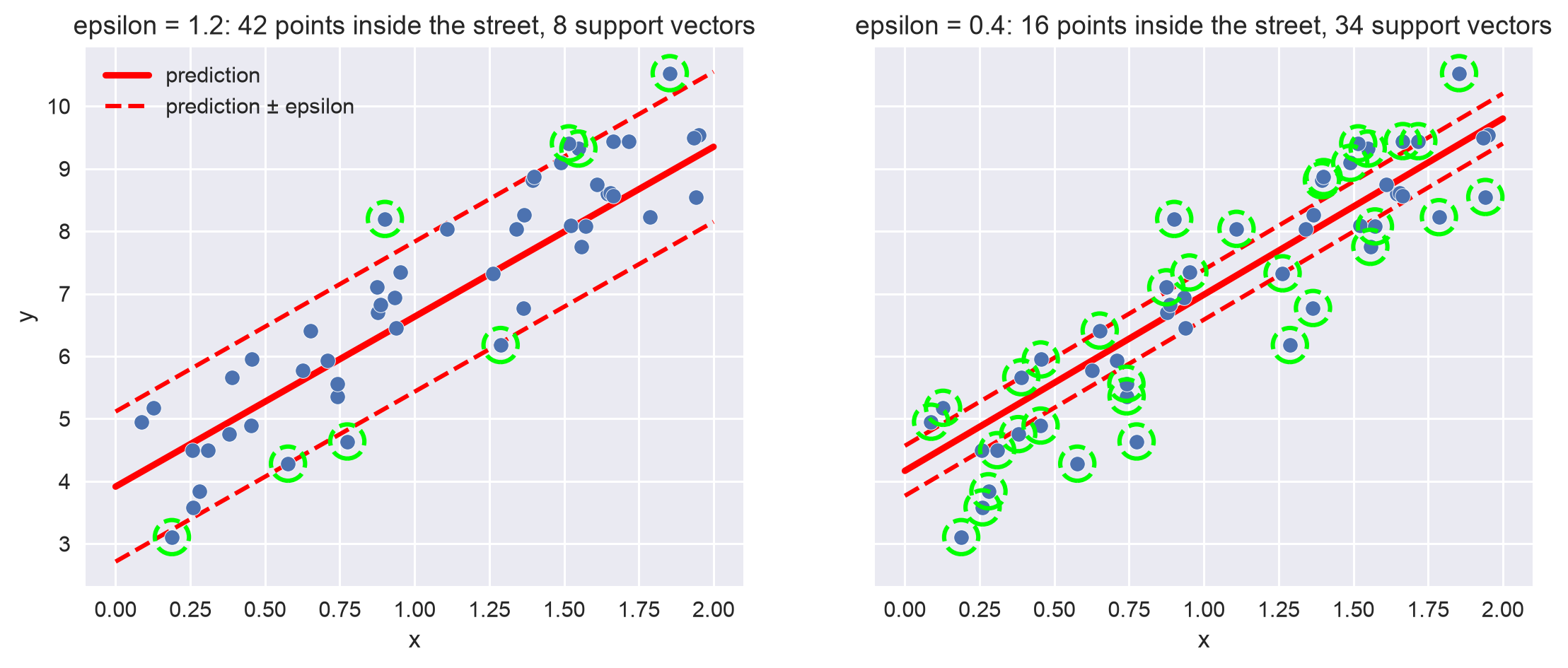
We compare SVM regression (SVR) with linear regression on the housing dataset, using the same three features as the Linear Regression lecture:
import numpy as np
import pandas as pd
from sklearn.model_selection import train_test_split
from sklearn.pipeline import Pipeline
from sklearn.preprocessing import StandardScaler
from sklearn.linear_model import LinearRegression
from sklearn.svm import SVR
from sklearn.metrics import mean_squared_error

df = pd.read_csv('housing.csv')

# for simplicity, only use population, median_income, and housing_median_age
X = df[['population', 'median_income', 'housing_median_age']]
y = df['median_house_value']

X_train, X_test, y_train, y_test = train_test_split(X, y, test_size=0.2, random_state=42)

# all three features are numerical with no missing values, so scaling is the only preprocessing
lin_reg_model = Pipeline(
    steps=[
        ('scaler', StandardScaler()),
        ('lin_reg', LinearRegression()),
    ]
)

svm_reg_model = Pipeline(
    steps=[
        ('scaler', StandardScaler()),
        ('svm_reg', SVR()),  # we use all default parameters here
    ]
)

# train the two models
lin_reg_model.fit(X_train, y_train)
svm_reg_model.fit(X_train, y_train)

# calculate the RMSE on the test set
lin_rmse = np.sqrt(mean_squared_error(y_test, lin_reg_model.predict(X_test)))
svr_rmse = np.sqrt(mean_squared_error(y_test, svm_reg_model.predict(X_test)))

print(f'linear regression rmse is: {lin_rmse:.3f}')
print(f'SVM regression rmse is: {svr_rmse:.3f}')

Output:
linear regression rmse is: 81323.636
SVM regression rmse is: 116720.049
Without tuning, simple linear regression outperforms SVM regression by a lot. The default C=1 is far too small for a target measured in hundreds of thousands of dollars: it barely lets the model fit the data. With a much larger C, SVR beats linear regression:
svm_reg_model = Pipeline(
    steps=[
        ('scaler', StandardScaler()),
        ('svm_reg', SVR(C=100000)),
    ]
)
svm_reg_model.fit(X_train, y_train)

svr_rmse = np.sqrt(mean_squared_error(y_test, svm_reg_model.predict(X_test)))
print(f'SVM regression rmse is: {svr_rmse:.3f}')

Output:
SVM regression rmse is: 80173.696
Like degree, C, and the kernel in classification, C and epsilon in SVM regression should be tuned, for example with grid search.
Appendix: Plotting Code
The code below draws the three figures in Linear SVM Classification. It is self-contained: it reads iris.csv again and keeps only setosa and versicolor.
import numpy as np
import pandas as pd
import matplotlib.pyplot as plt
import seaborn as sns
from sklearn.svm import SVC
plt.style.use('seaborn-v0_8')

df = pd.read_csv('iris.csv')
df = df[df.type != 'Iris-virginica']

x = np.linspace(0, 6, 100)  # x values to draw the lines


def plot_iris():
    # the same scatter plot as at the top of the page, with the axis range fixed
    # so the lines drawn on top don't stretch it
    fig, ax = plt.subplots()
    sns.scatterplot(data=df, x='petal_length', y='petal_width', hue='type', ax=ax)
    ax.set_xlim(0.8, 5.3)
    ax.set_ylim(0, 1.9)
    return ax


# Figure 04: blue separates the classes; red cuts through the setosa points
ax = plot_iris()
ax.plot(x, 1.1 * (x - 1.8), color='blue', linewidth=3)
ax.plot(x, 0.25 * (x - 0.9), color='red', linewidth=3)
plt.show()

# Figure 05: both lines separate the classes, but blue runs close to setosa
# and red runs close to versicolor
ax = plot_iris()
ax.plot(x, 2.48 - 1.04 * x, color='blue', linewidth=3)
ax.plot(x, 3.1 - 0.7 * x, color='red', linewidth=3)
plt.show()

# Figure 06: a hard margin linear SVM (a huge C allows no margin violations)
X = df[['petal_length', 'petal_width']]
y = df['type']
svm = SVC(kernel='linear', C=1e6).fit(X, y)
w1, w2 = svm.coef_[0]
b = svm.intercept_[0]

# the boundary is w1*x + w2*y + b = 0; the margin lines are where it equals -1 and +1
ax = plot_iris()
ax.plot(x, -(w1 * x + b) / w2, color='red', linewidth=3)
ax.plot(x, -(w1 * x + b - 1) / w2, color='red', linewidth=3, linestyle='--')
ax.plot(x, -(w1 * x + b + 1) / w2, color='red', linewidth=3, linestyle='--')

# circle the support vectors
sv = svm.support_vectors_
ax.scatter(sv[:, 0], sv[:, 1], s=600, facecolors='none', edgecolors='lime',
           linewidths=2, linestyle='--')
plt.show()
The margin figures in Hard vs. Soft Margin Classification and SVM Regression are drawn by the code below, which is also self-contained:
import numpy as np
import pandas as pd
import matplotlib.pyplot as plt
from sklearn.svm import SVC, SVR
from sklearn.pipeline import Pipeline
from sklearn.preprocessing import StandardScaler
plt.style.use('seaborn-v0_8')

iris = pd.read_csv('iris.csv')
colors = {'Iris-setosa': '#4C72B0', 'Iris-versicolor': '#55A868', 'Iris-virginica': '#8172B3'}


def plot_street(ax, model, xlim, ylim):
    # evaluate the decision function on a grid: the boundary is where it equals 0,
    # the margin lines (edges of the street) are where it equals -1 and +1
    xx, yy = np.meshgrid(np.linspace(*xlim, 300), np.linspace(*ylim, 300))
    grid = pd.DataFrame({'petal_length': xx.ravel(), 'petal_width': yy.ravel()})
    z = model.decision_function(grid).reshape(xx.shape)
    ax.contour(xx, yy, z, levels=[-1, 0, 1], colors='red',
               linestyles=['--', '-', '--'], linewidths=[2, 3, 2])
    ax.set_xlim(xlim)
    ax.set_ylim(ylim)


def plot_points(ax, data):
    for name, group in data.groupby('type'):
        ax.scatter(group.petal_length, group.petal_width, color=colors[name],
                   label=name, s=50, edgecolors='white', zorder=3)


def circle_support_vectors(ax, points):
    ax.scatter(points[:, 0], points[:, 1], s=250, facecolors='none',
               edgecolors='lime', linewidths=2, linestyle='--', zorder=4)


# Figure 07: a single outlier breaks a hard margin
two = iris[iris.type != 'Iris-virginica'][['petal_length', 'petal_width', 'type']]
fig, axes = plt.subplots(1, 2, figsize=(12, 4.5), sharey=True)
xlim, ylim = (0.8, 5.3), (0, 1.9)
outliers = [(4.0, 1.25), (3.2, 0.8)]  # both are labeled setosa
label_at = [(2.7, 1.65), (2.2, 0.35)]  # where to write 'outlier' in each panel

for ax, (ox, oy), text_xy in zip(axes, outliers, label_at):
    data = pd.concat([two, pd.DataFrame({'petal_length': [ox], 'petal_width': [oy],
                                         'type': ['Iris-setosa']})])
    plot_points(ax, data)
    ax.annotate('outlier', xy=(ox, oy), xytext=text_xy, fontsize=12,
                arrowprops=dict(arrowstyle='->', color='black', lw=1.5))
    svm = SVC(kernel='linear', C=1e6).fit(data[['petal_length', 'petal_width']], data.type)
    accuracy = svm.score(data[['petal_length', 'petal_width']], data.type)
    if accuracy < 1:
        # no straight line puts every point on its own side
        ax.text(1.2, 1.15, 'no hard margin possible', color='red', fontsize=15)
        ax.set_title(f'Outlier inside versicolor: training accuracy {accuracy:.2f}')
    else:
        plot_street(ax, svm, xlim, ylim)
        circle_support_vectors(ax, svm.support_vectors_)
        width = 2 / np.linalg.norm(svm.coef_[0])
        ax.set_title(f'Outlier near versicolor: street width {width:.2f}')
    ax.set_xlim(xlim)
    ax.set_ylim(ylim)
    ax.set_xlabel('petal_length')
axes[0].set_ylabel('petal_width')
axes[0].legend(loc='lower right')
plt.show()

# Figure 08: the effect of C on versicolor vs. virginica, which overlap
two = iris[iris.type != 'Iris-setosa']
X = two[['petal_length', 'petal_width']]
y = two.type
fig, axes = plt.subplots(1, 2, figsize=(12, 4.5), sharey=True)
xlim, ylim = (2.8, 7.1), (0.9, 2.6)

for ax, C in zip(axes, [1, 100]):
    model = Pipeline(steps=[('scaler', StandardScaler()),
                            ('svm', SVC(kernel='linear', C=C))]).fit(X, y)
    plot_points(ax, two)
    plot_street(ax, model, xlim, ylim)  # the grid is in original units
    circle_support_vectors(ax, X.iloc[model['svm'].support_].to_numpy())
    n_sv = len(model['svm'].support_)
    ax.set_title(f'C = {C}: {n_sv} support vectors')
    ax.set_xlabel('petal_length')
axes[0].set_ylabel('petal_width')
# put the legend below the panels so it does not cover the street
fig.legend(*axes[0].get_legend_handles_labels(), loc='lower center', ncol=2,
           bbox_to_anchor=(0.5, -0.08))
plt.show()

# Figure 13: SVM regression with two values of epsilon
rng = np.random.default_rng(42)
x = 2 * rng.random(50)
y = 4 + 3 * x + rng.normal(0, 1, 50)
x_line = np.linspace(0, 2, 100)
fig, axes = plt.subplots(1, 2, figsize=(12, 4.5), sharey=True)

for ax, epsilon in zip(axes, [1.2, 0.4]):
    svr = SVR(kernel='linear', epsilon=epsilon).fit(x.reshape(-1, 1), y)
    y_line = svr.predict(x_line.reshape(-1, 1))
    ax.plot(x_line, y_line, color='red', linewidth=3, label='prediction')
    ax.plot(x_line, y_line + epsilon, color='red', linewidth=2, linestyle='--',
            label='prediction ± epsilon')
    ax.plot(x_line, y_line - epsilon, color='red', linewidth=2, linestyle='--')
    ax.scatter(x, y, color='#4C72B0', s=50, edgecolors='white', zorder=3)
    # the support vectors are the points on or outside the street
    sv = svr.support_
    ax.scatter(x[sv], y[sv], s=250, facecolors='none', edgecolors='lime',
               linewidths=2, linestyle='--', zorder=4)
    ax.set_title(f'epsilon = {epsilon}: {len(x) - len(sv)} points inside the street, '
                 f'{len(sv)} support vectors')
    ax.set_xlabel('x')
axes[0].set_ylabel('y')
axes[0].legend(loc='upper left')
plt.show()
Logistic Regression
Logistic regression (also called logit regression) estimates the probability that an instance belongs to a class — such as the probability that a customer…
Ensemble Learning
In this lecture, we cover the three types of ensemble learning — voting, bagging (including random forest), and boosting (AdaBoost, Gradient Boosting, and…