
Decision Tree Prediction
We create a basic Decision Tree model with all default settings to show the key steps for building a baseline model-based prediction (no model selection, no model tuning, etc. which will be covered later).
The key steps are:
- select features and target
- data pre-processing
- handle missing data
- handle outliers
- standardization
- categorical data encoding
- build a machine learning model
- use the model to predict (NOTE: the testing data must go through the same data pre-processing steps to match the training data format)
We use the Titanic train.csv and test.csv from the Kaggle lecture. If you don't have them, download titanic_dataset.zip and unzip it into the folder where you run the code.
import pandas as pd
import matplotlib.pyplot as plt

# read training data
df_train = pd.read_csv('train.csv')

# specify features and target (remove unuseful features)
df_train = df_train[['Survived', 'Sex', 'Pclass', 'SibSp', 'Fare', 'Embarked']]

# data preprocessing
df_train.dropna(inplace=True)  # drop missing values

gender_dummies = pd.get_dummies(df_train.Sex, dtype=int)  # one-hot encoding for Sex
embarked_dummies = pd.get_dummies(df_train.Embarked, dtype=int)  # one-hot encoding for Embarked

df_num = df_train[['Survived', 'Pclass', 'SibSp', 'Fare']]  # choose numerical features

df_train_processed = pd.concat([df_num, gender_dummies, embarked_dummies], axis=1)  # concatenate all dataframes into one
df_train_processed.head()

Output:
   Survived  Pclass  SibSp     Fare  female  male  C  Q  S
0         0       3      1   7.2500       0     1  0  0  1
1         1       1      1  71.2833       1     0  1  0  0
2         1       3      0   7.9250       1     0  0  0  1
3         1       1      1  53.1000       1     0  0  0  1
4         0       3      0   8.0500       0     1  0  0  1
# get features and target
X = df_train_processed.drop('Survived', axis=1)
y = df_train_processed['Survived']# train a DT model by using all default settings
# note the default criterion='gini', which can be changed to criterion='entropy'
from sklearn.tree import DecisionTreeClassifier
tree_clf = DecisionTreeClassifier(random_state=42) # fixed seed so the tree, and its predictions, are the same every run
tree_clf.fit(X, y); # ; hides the fitted-model display, which some VS Code setups cannot renderprepare test samples (two passengers):
# passenger 1 who bought a class 3 ticket at $8.5 with no siblings / spouses, Jack ?
# passenger 2 who bought a first class ticket at $88 with no siblings / spouses, Rose ?
p = {
'Pclass': [3, 1], # [] needed, even for one row
'SibSp': [0, 0],
'Fare': [7, 85],
'female': [0, 1],
'male': [1, 0],
'C': [0, 0],
'Q': [0, 0],
'S': [1, 1],
}
df_p = pd.DataFrame(p)
df_p
Output:
Pclass SibSp Fare female male C Q S
0 3 0 7 0 1 0 0 1
1 1 0 85 1 0 0 0 1# make predictions
p_pred = tree_clf.predict(df_p)
p_pred
array([0, 1]) # this means first passenger predicted dead, second one survivedGet test dataset from Kaggle.
# this is training dataframe, the testing dataframe must match this format
X.head()
Output:
Pclass SibSp Fare female male C Q S
0 3 1 7.2500 0 1 0 0 1
1 1 1 71.2833 1 0 1 0 0
2 3 0 7.9250 1 0 0 0 1
3 1 1 53.1000 1 0 0 0 1
4 3 0 8.0500 0 1 0 0 1df_test = pd.read_csv('test.csv')
# process test dataset for prediction
# NOTE: we CANNOT remove any rows from the test data for Kaggle prediction scoring
# read testing data
df_test = pd.read_csv('test.csv')
# select the same features as in training data X + PassengerId which we will need for submission
df_test = df_test[['PassengerId', 'Sex', 'Pclass', 'SibSp', 'Fare', 'Embarked']].copy()
# check missing values
df_test.isnull().sum()
PassengerId 0
Sex 0
Pclass 0
SibSp 0
Fare 1
Embarked 0
dtype: int64We cannot remove rows for Kaggle testing dataset, so we use mean to fill the missing data:
# we have to impute the missing values for Kaggle prediction scoring
# we just fill the missing fare with the mean
fare_mean = df_test.Fare.mean()
df_test.Fare = df_test.Fare.fillna(fare_mean)
# sanity check for missing values
df_test.isnull().sum()
PassengerId 0
Sex 0
Pclass 0
SibSp 0
Fare 0
Embarked 0
dtype: int64# test data encoding
gender_dummies_test = pd.get_dummies(df_test.Sex, dtype=int) # one-hot encoding for Sex
embarked_dummies_test = pd.get_dummies(df_test.Embarked, dtype=int) # one-hot encoding for Embarked
df_num_test = df_test[['Pclass', 'SibSp', 'Fare']] # choose numerical features
X_test = pd.concat([df_num_test, gender_dummies_test, embarked_dummies_test], axis=1) # concatenate all dataframes into one
X_test.head() # this should match the training X format
Output:
Pclass SibSp Fare female male C Q S
0 3 0 7.8292 0 1 0 1 0
1 3 1 7.0000 1 0 0 0 1
2 2 0 9.6875 0 1 0 1 0
3 3 0 8.6625 0 1 0 0 1
4 3 1 12.2875 1 0 0 0 1Make predictions:
y_hat = tree_clf.predict(X_test)
y_hat # a numpy array with prediction results
Output:
array([0, 1, 0, 0, 1, 0, 0, 0, 1, 0, 0, 0, 1, 0, 1, 1, 0, 0, 0, 1, 0, 0,
1, 0, 1, 0, 1, 0, 1, 0, 0, 0, 1, 0, 1, 0, 0, 0, 0, 1, 1, 0, 0, 1,
1, 0, 0, 0, 1, 1, 0, 0, 1, 1, 0, 0, 0, 0, 0, 1, 0, 0, 0, 1, 0, 1,
1, 0, 0, 1, 1, 0, 1, 0, 1, 0, 0, 1, 0, 1, 1, 0, 0, 0, 0, 0, 1, 0,
1, 0, 0, 0, 1, 0, 0, 0, 1, 0, 0, 0, 1, 0, 0, 0, 1, 0, 0, 0, 0, 0,
0, 1, 1, 0, 1, 0, 0, 1, 1, 1, 1, 0, 1, 0, 0, 1, 0, 1, 0, 0, 0, 0,
0, 0, 0, 0, 0, 0, 0, 1, 0, 1, 0, 0, 0, 0, 0, 0, 0, 0, 1, 0, 1, 1,
0, 0, 1, 0, 0, 0, 1, 1, 1, 0, 0, 1, 0, 0, 1, 0, 0, 0, 0, 0, 0, 1,
1, 1, 1, 1, 0, 0, 1, 0, 1, 0, 1, 0, 0, 0, 0, 0, 0, 0, 0, 0, 0, 0,
0, 0, 1, 0, 0, 1, 0, 0, 1, 0, 1, 0, 0, 0, 0, 1, 1, 0, 1, 0, 1, 0,
1, 0, 1, 0, 1, 0, 0, 1, 0, 0, 0, 1, 0, 0, 1, 0, 1, 0, 0, 1, 1, 1,
1, 0, 0, 0, 1, 0, 1, 0, 1, 0, 1, 0, 0, 0, 0, 0, 1, 0, 0, 0, 1, 1,
0, 0, 0, 0, 0, 0, 1, 0, 1, 1, 0, 1, 0, 0, 0, 0, 0, 0, 1, 0, 0, 0,
0, 0, 0, 0, 0, 0, 0, 0, 0, 0, 1, 0, 0, 0, 0, 0, 0, 0, 1, 1, 1, 0,
1, 0, 0, 0, 0, 1, 1, 1, 1, 0, 0, 0, 0, 0, 0, 0, 1, 0, 1, 0, 0, 0,
1, 0, 0, 1, 0, 0, 0, 0, 0, 0, 0, 0, 1, 1, 0, 1, 0, 1, 0, 1, 1, 0,
0, 0, 1, 0, 1, 0, 0, 1, 0, 1, 1, 0, 1, 0, 0, 0, 1, 1, 0, 1, 0, 0,
1, 1, 0, 0, 0, 0, 0, 0, 0, 1, 0, 1, 0, 0, 0, 0, 1, 1, 1, 0, 0, 1,
0, 1, 0, 0, 1, 0, 1, 0, 0, 1, 0, 0, 1, 0, 1, 1, 0, 0, 1, 0, 0, 0])# combine the final dataframe from two arrays
df_submit_dt = pd.DataFrame({
'PassengerId': df_test.PassengerId,
'Survived': y_hat,
})
df_submit_dt.head()
Output:
PassengerId Survived
0 892 0
1 893 1
2 894 0
3 895 0
4 896 1# export the csv for submission
df_submit_dt.to_csv('submit_simple_dt.csv', index=False)This basic model-based prediction gets 0.7799 accuracy, which beats the gender-based prediction baseline.

Next, we will learn how models are evaluated and how to do model evaluation when we only have training data (no need to submit to Kaggle)
Tree Visualization (Optional)
You can visualize the decision tree as follows:
from sklearn import tree
fig, ax = plt.subplots(figsize=(25, 20))
tree.plot_tree(tree_clf)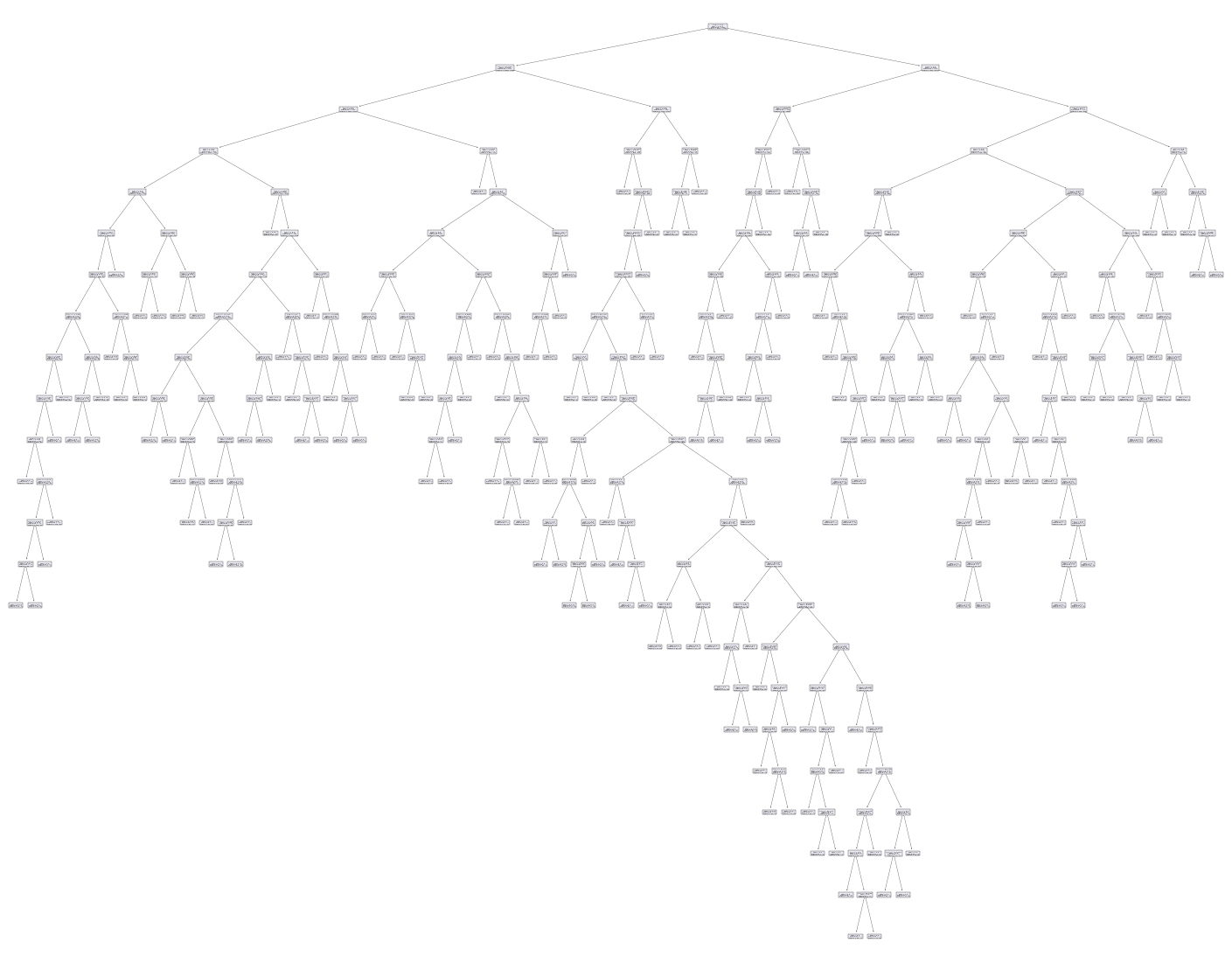
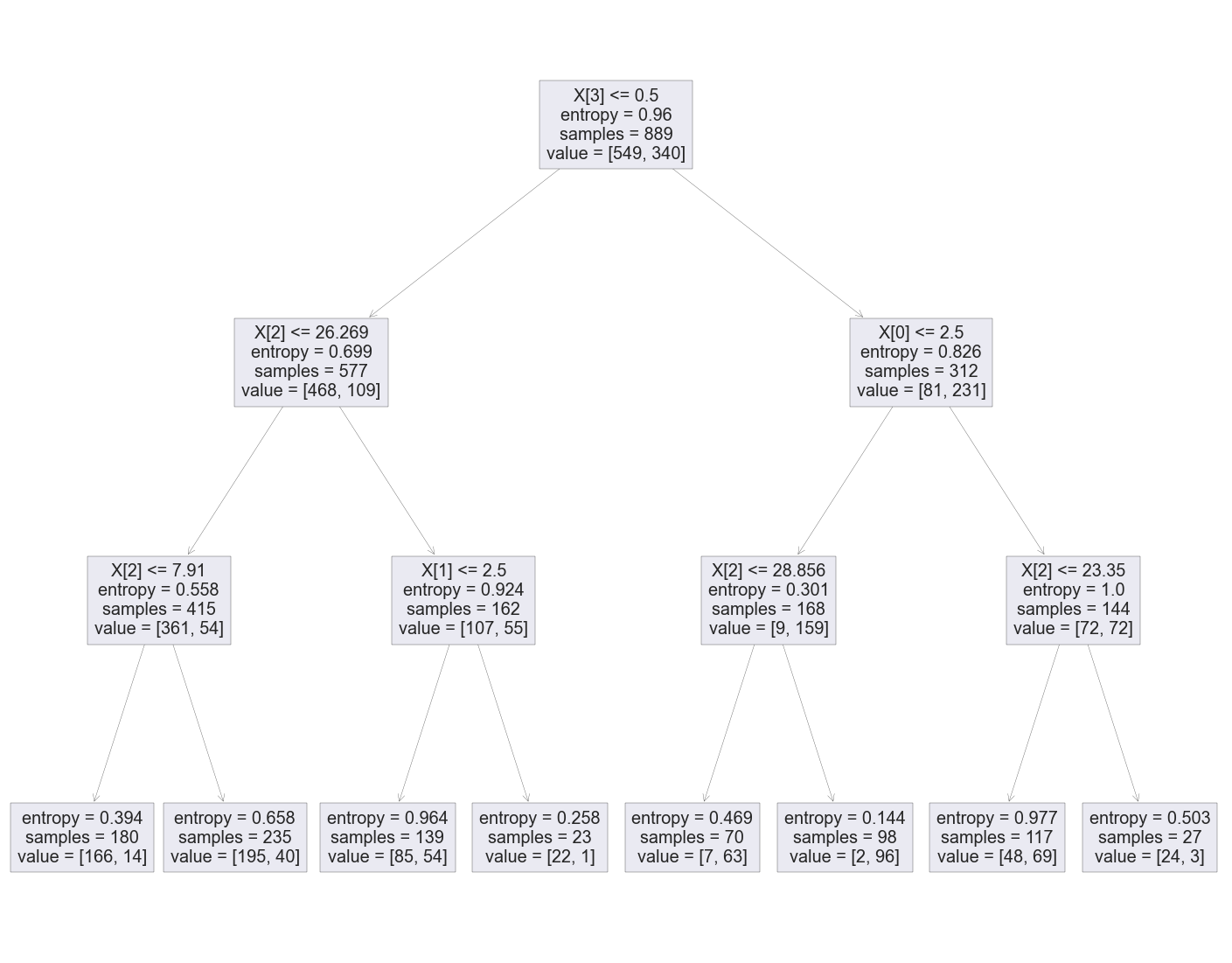
The decision tree above this very complicated which may indicate overfitting (will be introduced later). We can tune the model by creating a new model with different parameters:
# a tree using entropy and max-depth 3
tree_clf_simple = DecisionTreeClassifier(criterion='entropy', max_depth=3)
tree_clf_simple.fit(X, y) # a new model is trained using the same data
# show the tree
fig, ax = plt.subplots(figsize=(25, 20))
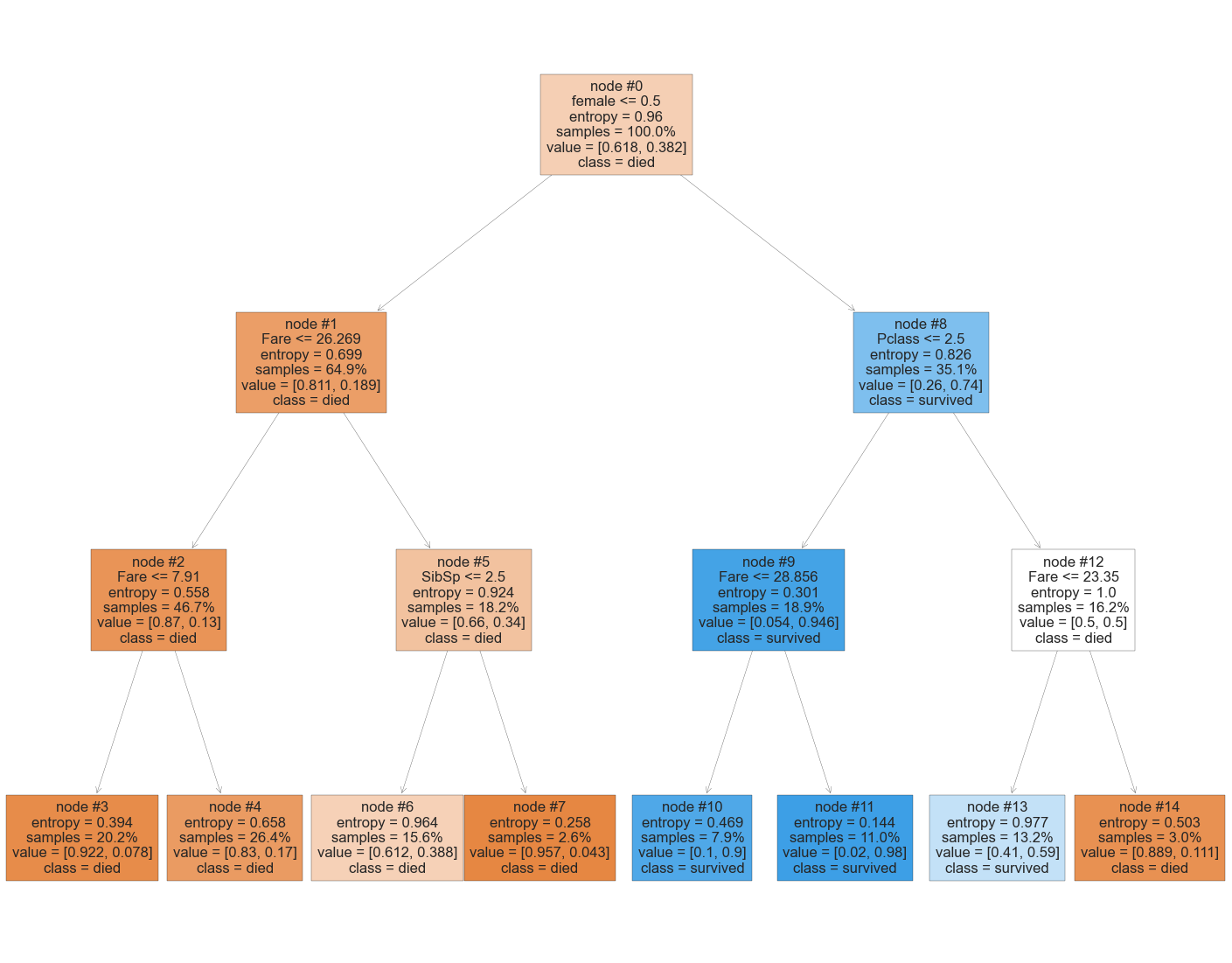
tree.plot_tree(tree_clf_simple)Note the tree has not feature names and labels - hard to interpret:
# get feature and class names for visualization
cls_names = ['died', 'survived'] # died 0, survived 1
cls_names
feature_list = X.columns.values
feature_list
array(['Pclass', 'SibSp', 'Fare', 'female', 'male', 'C', 'Q', 'S'], dtype=object)show the tree again with new settings:
fig, ax = plt.subplots(figsize=(25, 20))
tree.plot_tree(
tree_clf_simple,
feature_names=feature_list,
class_names=cls_names,
filled=True,
proportion=True,
node_ids=True
)Yes to the left, No to the right - let’s make some predictions and see how this tree works.
df_p # test data with two passengers
Output:
Pclass SibSp Fare female male C Q S
0 3 0 7 0 1 0 0 1
1 1 0 85 1 0 0 0 1# use the new tree to make predictions
p_pred_simple = tree_clf_simple.predict(df_p)
p_pred_simple
array([0, 1])We can walk through the tree to see how the predictions were made using the tree.
Complete Code
The whole workflow above as a single script, with the imports included. The # %% markers split it into cells if you run it in VS Code's interactive window.
# %%
import numpy as np
import pandas as pd
import matplotlib.pyplot as plt
plt.style.use('seaborn-v0_8')
# read training data
df_train = pd.read_csv('train.csv')
# specify features and target (remove unuseful features)
df_train = df_train[['Survived', 'Sex', 'Pclass', 'SibSp', 'Fare', 'Embarked']]
# data preprocessing
df_train.dropna(inplace=True) # drop missing values
gender_dummies = pd.get_dummies(df_train.Sex, dtype=int) # one-hot encoding for Sex
embarked_dummies = pd.get_dummies(df_train.Embarked, dtype=int) # one-hot encoding for Embarked
df_num = df_train[['Survived', 'Pclass', 'SibSp', 'Fare']] # choose numerical features
df_train_processed = pd.concat([df_num, gender_dummies, embarked_dummies], axis=1) # concatenate all dataframes into one
df_train_processed.head()
# %%
X = df_train_processed.drop('Survived', axis=1)
y = df_train_processed['Survived']
# train a DT model by using all default settings
# note the default criterion='gini', which can be changed to criterion='entropy'

from sklearn.tree import DecisionTreeClassifier
tree_clf = DecisionTreeClassifier(random_state=42)  # fixed seed so the tree, and its predictions, are the same every run
tree_clf.fit(X, y);  # ; hides the fitted-model display, which some VS Code setups cannot render
# %%
# passenger 1 who bought a class 3 ticket at $8.5 with no siblings / spouses, Jack ?
# passenger 2 who bought a first class ticket at $88 with no siblings / spouses, Rose ?
p = {
'Pclass': [3, 1], # [] needed, even for one row
'SibSp': [0, 0],
'Fare': [7, 85],
'female': [0, 1],
'male': [1, 0],
'C': [0, 0],
'Q': [0, 0],
'S': [1, 1],
}
df_p = pd.DataFrame(p)
# %%
p_pred = tree_clf.predict(df_p)
# %%
df_test = pd.read_csv('test.csv')
# %%
# process test dataset for prediction
# NOTE: we CANNOT remove any rows from the test data for Kaggle prediction scoring
# read testing data
df_test = pd.read_csv('test.csv')
# select the same features as in training data X + PassengerId which we will need for submission
df_test = df_test[['PassengerId', 'Sex', 'Pclass', 'SibSp', 'Fare', 'Embarked']].copy()
# check missing values
df_test.isnull().sum()
# %%
# we have to impute the missing values for Kaggle prediction scoring
# we just fill the missing fare with the mean
fare_mean = df_test.Fare.mean()
df_test.Fare = df_test.Fare.fillna(fare_mean)
# %%
# sanity check for missing values
df_test.isnull().sum()
# %%
gender_dummies_test = pd.get_dummies(df_test.Sex, dtype=int) # one-hot encoding for Sex
embarked_dummies_test = pd.get_dummies(df_test.Embarked, dtype=int) # one-hot encoding for Embarked
df_num_test = df_test[['Pclass', 'SibSp', 'Fare']] # choose numerical features
X_test = pd.concat([df_num_test, gender_dummies_test, embarked_dummies_test], axis=1) # concatenate all dataframes into one
X_test.head()
# %%
y_hat = tree_clf.predict(X_test)
y_hat # a numpy array with prediction results
# %%
# combine the final dataframe from two arrays
df_submit_dt = pd.DataFrame({
'PassengerId': df_test.PassengerId,
'Survived': y_hat,
})
df_submit_dt.head()
# %%
df_submit_dt.to_csv('submit_simple_dt.csv', index=False)
# %%
from sklearn import tree
fig, ax = plt.subplots(figsize=(25, 20))
tree.plot_tree(tree_clf)
# %%
tree_clf_simple = DecisionTreeClassifier(criterion='entropy', max_depth=3)
tree_clf_simple.fit(X, y); # ; hides the fitted-model display, which some VS Code setups cannot render
# %%
fig, ax = plt.subplots(figsize=(25, 20))
tree.plot_tree(tree_clf_simple)
# %%
# get feature and class names for visualization
cls_names = ['died', 'survived'] # died 0, survived 1
cls_names
# %%
feature_list = X.columns.values
feature_list
# %% [markdown]
# You can see a huge tree, which shows the overfitting problem we will discuss in the future. Let's set the `criterion='entropy'` and `max_depth=3` to generate a simpler tree.
# %%
fig, ax = plt.subplots(figsize=(25, 20))
tree.plot_tree(
    tree_clf_simple,
    feature_names=feature_list,
    class_names=cls_names,
    filled=True,
    proportion=True,
    node_ids=True
    )
# %%
df_p
# %%
# use the new tree to make predictions
p_pred_simple = tree_clf_simple.predict(df_p)
p_pred_simpleDecision Tree Basics
Predictive analytics problems can be largely categorized into either class prediction (classification) or numeric prediction (regression) problems.
Model Evaluation
How good is a model before Kaggle tells you? We first cover the measures behind the score and how to estimate it yourself with validation, then put them to…